
A proxy server is the digital equivalent of a middleman: it sits between your device and the internet, making requests on your behalf so websites never see your real identity. That one sentence covers 90% of what most people need to know. But the real value is in the details — understanding the different types, practical use cases, and why businesses and individuals rely on proxy servers every single day. This guide covers all of it clearly, without the technical jargon.
What Does a Proxy Server Actually Do?
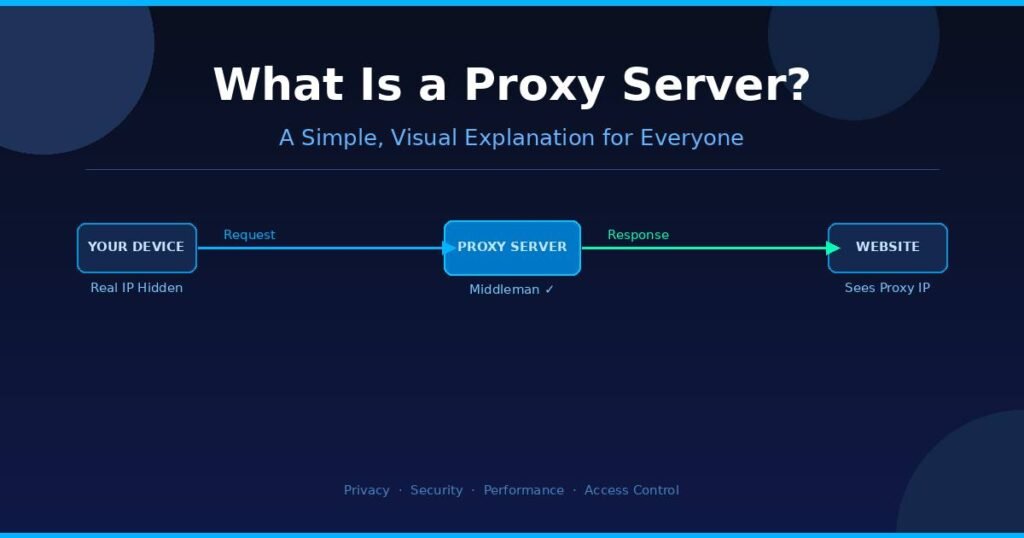
A proxy server acts as an intermediary that receives your web request, forwards it to the target website, and sends the response back to you — all while showing the website its own IP address instead of yours. You stay hidden. The website sees the proxy.
Here’s the step-by-step flow every time you use one:
- You type a URL or click a link in your browser.
- Your request goes to the proxy server first — not directly to the website.
- The proxy forwards your request to the target website using its own IP address.
- The website responds to the proxy server.
- The proxy sends that response back to you — you see the page normally.
The entire process happens in milliseconds. From your end, it feels no different from browsing without a proxy — unless you’re bypassing a restriction that would have blocked you otherwise.
Think of it like ordering food through a delivery app. The restaurant doesn’t know your home address — they only see the driver. The proxy is the driver.
What makes a proxy server useful beyond just hiding your IP? Modern proxy servers also:
- Cache data — storing copies of frequently visited pages so they load faster next time.
- Filter content — blocking harmful websites at the network level before they ever reach your device.
- Log traffic — letting network admins see exactly what resources are being accessed on their network.
- Compress data — reducing bandwidth consumption, which matters on slow or metered connections.
What Are the Main Types of Proxy Servers?
Not all proxy servers work the same way. Each type is built for a specific job — and using the wrong one for your situation means you’re either over-engineering or under-protecting. Here are the five types you’ll actually encounter:
1. Forward Proxy
This is the most common type. A forward proxy handles requests from users to the internet. When companies want to control what websites employees can visit, they deploy a forward proxy. Your request goes through it, gets approved (or blocked), and the proxy fetches the content on your behalf.
Real-world use: A school network using a forward proxy to block social media during class hours.
2. Reverse Proxy
A reverse proxy works in the opposite direction — it sits in front of a web server, not a user’s device. When you visit a major website, your request often hits a reverse proxy first, which then routes it to the appropriate backend server.
Real-world use: Netflix uses reverse proxies to distribute traffic across thousands of servers globally, preventing any single server from getting overwhelmed.
3. Transparent Proxy
A transparent proxy intercepts your traffic without requiring any configuration on your device. You don’t even know it’s there. ISPs and public Wi-Fi networks (like in hotels or airports) often deploy these to cache popular content or filter certain sites.
Real-world use: Your hotel’s Wi-Fi showing a captive portal login page before granting internet access — that’s a transparent proxy at work.
4. Anonymous Proxy
An anonymous proxy hides your IP address from the websites you visit, but it still identifies itself as a proxy to those sites. It provides a moderate level of privacy — better than nothing, but detectable.
Real-world use: Accessing region-locked content from a different country.
5. High-Anonymity (Elite) Proxy
This is the most private type. It hides your IP and doesn’t reveal that a proxy is being used at all. The destination website has no idea the traffic is coming through an intermediary.
Real-world use: Security researchers, journalists, and privacy-focused users who need genuine anonymity.
Where Are Proxy Servers Actually Used? Real Examples
Proxy servers aren’t just a privacy tool for individuals — they’re fundamental infrastructure for businesses, governments, and educational institutions. In my testing and research across enterprise security setups, a few use cases keep coming up again and again.
Corporate Networks
Most large companies route all employee internet traffic through a proxy. This lets IT teams enforce content policies, prevent malware downloads, and log network activity for compliance purposes. According to market research, forward proxies account for over 30% of proxy server deployments in enterprise environments.
Content Delivery and Load Balancing
Major platforms use reverse proxies to distribute millions of daily requests across server farms. Without them, peak traffic events — like a product launch or a major sports broadcast — would crash the servers. Cloudflare, one of the largest reverse proxy providers, processes trillions of requests each month for websites of every size.
Web Scraping and Research
Data analysts, market researchers, and developers use proxy servers to collect publicly available information from websites at scale. The global proxy server service market is valued at over $1 billion in 2025 and is projected to reach $3.5 billion by 2033 — a large chunk of that demand comes from data collection use cases.
Bypassing Geo-Restrictions
Streaming services, news outlets, and some government websites restrict access based on your location. A proxy with a server in the target country lets you appear as a local user. This is why residential proxies — which use real IP addresses assigned to homes — are in such high demand.
School and Library Filtering
Educational institutions deploy transparent proxies to prevent students from accessing inappropriate or distracting content. Parents setting up family network filters at home use the same underlying technology.
Proxy Server vs. VPN — What’s the Real Difference?
This is the most common point of confusion. Proxies and VPNs both route your traffic through a remote server, but they are fundamentally different tools built for different problems.
| Feature | Proxy Server | VPN |
|---|---|---|
| IP Masking | ✅ Yes | ✅ Yes |
| Traffic Encryption | ❌ Usually none | ✅ Full encryption |
| Scope | Single app/browser | Entire device |
| Speed | Generally faster | Slightly slower |
| Setup Complexity | Low | Low to medium |
| Privacy Level | Moderate | High |
| Best For | Bypassing restrictions, caching, filtering | Secure browsing, public Wi-Fi, full privacy |
The key difference to lock in: a proxy hides where you are; a VPN also encrypts what you do.
If you’re on public Wi-Fi at a café and you check your bank account, a proxy offers almost no protection — because it doesn’t encrypt your data in transit. Anyone on the same network could still intercept that traffic. A VPN encrypts everything leaving your device, making interception meaningless.
On the other hand, if you just want to watch a video that’s region-locked to another country and security isn’t a concern, a proxy is faster and simpler to configure.
The bottom line: Use a proxy for speed and simple access tasks. Use a VPN when security and full privacy matter.
Common Proxy Server Myths (And What’s Actually True)
Myth 1: “A proxy makes me completely anonymous.” Not quite. Basic and anonymous proxies hide your IP from websites, but the proxy provider itself can see your real IP address and your traffic. Free proxy services especially have been caught logging and selling user data. If true anonymity is your goal, a high-anonymity proxy combined with encryption is the minimum — and even then, sophisticated tracking methods like browser fingerprinting can still identify you.
Myth 2: “Free proxies are safe to use.” This is the most dangerous myth. In my review of free proxy services, many operate under unclear ownership and questionable privacy policies. Some inject ads into web pages you visit. Others have been documented selling traffic logs. A free proxy is often the product, not the service.
Myth 3: “Proxies and VPNs are the same thing.” They’re related but not identical. The clearest summary: a VPN encrypts everything on your device; a proxy only handles traffic from one application. Someone who configures their browser with a proxy but then opens a desktop email client is bypassing the proxy entirely — their email app sends traffic directly over their real IP.
Myth 4: “Proxies slow down your internet significantly.” Not always. A well-configured caching proxy can actually speed up browsing by serving stored copies of frequently visited pages. The slowdown typically comes from overloaded or underpowered proxy servers — which is more common with free services than with commercial or enterprise-grade deployments.
Myth 5: “You need to be technical to set one up.” Modern proxy configuration is built into every major operating system. On Windows, it’s under Settings → Network & Internet → Proxy. On macOS, it’s under System Settings → Network → Proxies. Most of the time, you just paste in an IP address and port number.
Frequently Asked Questions
What is a proxy server in simple terms? A proxy server is a middleman computer that sits between your device and the internet. You send your web requests to it, it fetches the content for you, and sends it back — so websites see the proxy’s address, not yours.
Is a proxy server legal to use? Yes, using a proxy server is legal in most countries. However, how you use it matters — using a proxy to bypass access controls in violation of a service’s terms, or to conduct illegal activities, can carry legal consequences regardless of the tool used.
Can a proxy server be hacked? Yes. Like any server, a proxy can be compromised. Free or public proxies are particularly high-risk. Enterprise proxy servers used by businesses are typically secured with the same standards as any production server — firewalls, access controls, and monitoring.
Does a proxy server change your IP address? Yes. When you use a proxy, the website you visit sees the proxy server’s IP address instead of your real one. Your actual IP address is hidden from the destination, though the proxy server itself still knows it.
What is a reverse proxy used for? A reverse proxy sits in front of web servers, not user devices. It handles incoming requests for a website, distributing traffic across multiple backend servers, blocking malicious traffic, and improving performance through caching and load balancing.
Conclusion
A proxy server is one of the most practical tools in networking — whether you’re a student trying to access a blocked site, a business protecting its internal network, or a developer running automated data collection. The concept is simple: it’s a middleman that handles your internet requests on your behalf.
The most important thing to take away from this guide: proxies provide IP masking and traffic management, not full security. If your goal is genuine privacy or protection on unsecured networks, pair a proxy with a VPN or use a VPN alone.
If you’re setting one up for the first time, start with your operating system’s built-in proxy settings. For business use, consult with your IT team — enterprise proxy configurations involve content policies, logging requirements, and network architecture that go beyond a simple IP and port entry.
The proxy server market is growing fast because the problems it solves — privacy, performance, access control — aren’t going away. Understanding how they work puts you in a better position to use them wisely.
Dig deeper into topics that matter with our thorough research-based posts.