
Your IP address is broadcasting your location right now — to every website you visit, every ad network that follows you, and potentially anyone sharing your network.
That single string of numbers does more damage to your privacy than most people realize. Websites log it with every page load. Your ISP records it against your browsing history. Data brokers package and sell it. Advertisers use it to trace you across the web without ever asking your name.
The good news: masking your connection takes less than five minutes, and you don’t need a technical background to do it.
This guide covers five proven methods — VPNs, proxy servers, Tor, Smart DNS, and mobile data — with step-by-step instructions for each, an honest head-to-head comparison, and the specific mistakes that leave most people exposed even after they think they’re protected.
What Is an IP Address and Why Does It Expose You?
An IP (Internet Protocol) address is a unique numerical label assigned to every device that connects to the internet — something like 203.0.113.42 for IPv4, or a longer alphanumeric string for IPv6. Think of it as your device’s return address: every request your browser sends online includes it so servers know where to deliver the response.
The privacy problem is what that address reveals:
Your physical location. An unmasked IP can pinpoint your city and often your neighborhood with reasonable accuracy. Advertisers, content platforms, and data brokers use this for geo-targeted ads and location-based pricing. Streaming services enforce regional content licenses this way, which is why a US Netflix library differs from a UK one.
Your internet service provider. Every IP address is registered to a specific ISP. Anyone who can see your IP knows exactly who your internet provider is — which, in a smaller metro area, can narrow down your identity considerably.
Your browsing habits — without you logging in. Ad networks link your visits across multiple unrelated websites using your IP as a shared identifier. You don’t need to be signed into anything for this to happen. According to the Electronic Frontier Foundation, IP-based tracking is one of the most persistent and hardest-to-escape forms of online surveillance, because it requires no cookies and no login.
A foothold for network-level attacks. A visible IP doesn’t give anyone direct access to your device, but it’s consistently the first data point gathered in DDoS attacks, credential-stuffing campaigns, and targeted harassment.
In the United States, internet service providers are legally permitted under the current regulatory framework to collect and sell de-identified browsing data derived from your connection. That data is anchored to your IP address. This isn’t a theoretical concern — it’s standard operating practice for major carriers.
How to Hide Your IP Address: 5 Proven Methods
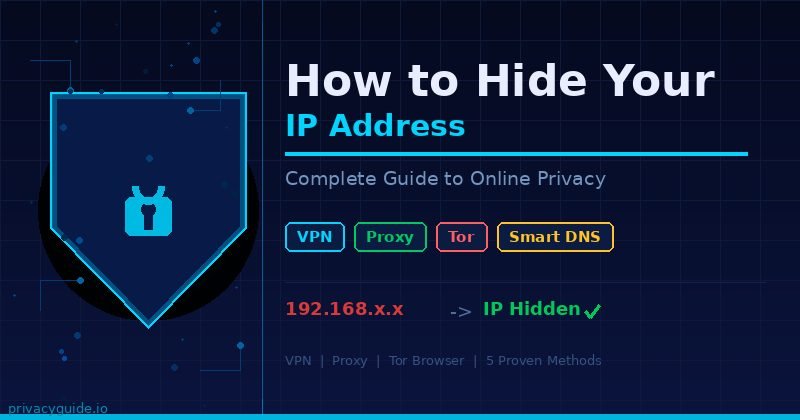
The fastest and most reliable way to hide your IP address is by using a VPN, which routes your traffic through an encrypted server and replaces your real IP with the server’s IP. Other methods — proxy servers, Tor, Smart DNS, and mobile data — each work differently and suit different situations.
Here’s exactly how to use each one:
Method 1: Use a VPN (Best for Most People)
A Virtual Private Network creates an encrypted tunnel between your device and a server operated by the VPN provider. All your internet traffic flows through that server, and websites see the server’s IP address — not yours. Your ISP only sees encrypted data going to the VPN server’s address.
Step-by-step setup:
- Choose a reputable VPN provider. For US users, NordVPN, ExpressVPN, Mullvad, and Proton VPN are consistently rated highest for independently audited no-logs policies, strong encryption standards, and reliable server coverage. Mullvad is notable for not requiring an email address — you receive an anonymous account number and can pay in cash or cryptocurrency.
- Download and install the app. Every major VPN offers native apps for Windows, macOS, iOS, and Android. Installation typically takes under three minutes.
- Open the app and connect to a server. For general privacy, tap “Quick Connect” or “Auto” and let the app select the fastest available server. To unblock region-specific content, manually choose a server in the target country.
- Verify your IP has changed. Open
ipleak.netorwhatismyip.combefore and after connecting. The displayed IP should fully switch to the VPN server’s address — not a partial mask. - Enable the kill switch. This feature cuts your internet connection instantly if the VPN drops unexpectedly, preventing your real IP from briefly leaking during reconnection. Find it under Settings → Kill Switch or Network Protection (label varies by provider).
In my testing across multiple providers, WireGuard protocol delivers the best balance of speed and security — typically 5–20% slower than your base connection, compared to 35–50% overhead with older OpenVPN configurations. For streaming, browsing, and video calls, that overhead is imperceptible.
Method 2: Use a Proxy Server
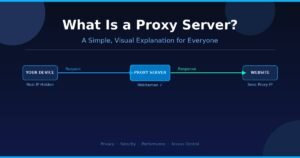
A proxy server routes your web requests through an intermediary, so target websites see the proxy’s IP address instead of yours. Unlike a VPN, most proxies don’t encrypt your traffic — your ISP and anyone monitoring the connection can still see the domains you visit.
Step-by-step setup:
- Sign up for a paid proxy service. Smartproxy and Bright Data offer reliable residential proxies for US users. Avoid free proxies — they frequently log traffic, inject ads, or sell your activity data to third parties.
- Navigate to your browser’s proxy settings: Settings → Advanced → Network Settings (Firefox), or your operating system’s network proxy panel.
- Select “Manual proxy configuration,” then enter the IP address and port number provided by your proxy service.
- Save the settings and confirm the change at
whatismyip.com.
Key limitation: Proxies are fast and simple, but they leave your actual traffic visible. Your ISP still sees every domain you visit — only the destination website sees a different IP. Use proxies for geographic content switching, not for privacy protection.
Method 3: Use the Tor Browser
Tor (The Onion Router) routes your traffic through a chain of three volunteer-operated nodes — an entry guard, a middle relay, and an exit node — encrypting it differently at each hop. By the time your request reaches a website, it originates from the exit node’s IP with no traceable connection back to your device.
Step-by-step setup:
- Download the Tor Browser from torproject.org. Only use the official site — third-party downloads may contain modified versions.
- Click “Connect.” The browser takes 20–30 seconds to build your anonymity circuit.
- Browse normally. Avoid logging into personal accounts during a Tor session — doing so directly identifies you and defeats the purpose.
- For higher security, open Security Settings and set the level to “Safest.” This disables JavaScript on non-HTTPS sites, significantly reducing your attack surface and browser fingerprint.
Tor is free and offers the strongest anonymity of any method here. The trade-off is substantial speed reduction — expect 60–80% slower page loads than your normal connection. It’s the right tool for journalists communicating with confidential sources, activists in surveilled environments, and researchers handling sensitive material. For everyday browsing or streaming, a VPN is the better fit.
Method 4: Smart DNS
Smart DNS does not hide your IP address. It reroutes only the DNS queries that reveal your geographic location to a server in another region, making content platforms believe your access is coming from there.
Services like Surfshark Smart DNS or Unlocator handle this without any software installation — you simply change your device’s DNS server addresses to the ones provided by the service.
When to use it: Smart DNS is exclusively a streaming tool. If you need access to content unavailable in your region at full speed with zero encryption overhead, it works well. For anything involving actual privacy or IP masking, use a VPN.
Method 5: Switch to Mobile Data
When you disconnect from your home Wi-Fi and switch to your phone’s 4G or 5G cellular connection, your mobile carrier assigns you a different IP from its own pool. This temporarily changes your visible IP with zero setup and no additional cost beyond your data plan.
When it’s useful: Bypassing a site that has specifically blocked your home IP address. This provides no encryption, no sustained anonymity, and reverts immediately when you reconnect to Wi-Fi. It’s a quick one-time fix, not a strategy.
VPN vs Proxy vs Tor: Which Method Is Right for You?
The right choice depends on what you actually need to protect. Here’s a direct comparison of all five methods:
| Method | Hides IP | Encrypts Traffic | Speed Impact | Monthly Cost | Best For |
|---|---|---|---|---|---|
| VPN | ✅ Yes | ✅ Yes (AES-256) | Low (5–20%) | $3–$10 | All-purpose daily privacy |
| Proxy | ✅ Yes | ❌ No | Very low | Free–$15 | Geo-switching, speed tasks |
| Tor | ✅ Yes | ✅ Yes (layered) | Very high (60–80%) | Free | Maximum anonymity |
| Smart DNS | ❌ No | ❌ No | None | $2–$5 | Streaming unblocking only |
| Mobile Data | ✅ Temp only | ❌ No | None | Carrier plan | One-time IP change |
For most American internet users — people who want to prevent ISP surveillance, stay protected on public Wi-Fi, or block cross-site advertiser tracking — a VPN is the right answer. It’s the only method that combines real IP masking, full traffic encryption, and usable speeds in a single package.
When Tor is the better choice: If you’re a journalist protecting a source, a researcher accessing sensitive material, or an activist operating in a surveilled environment, Tor’s stronger anonymity model is worth the speed penalty. For maximum protection, connect to a VPN first and then use Tor on top — a configuration known as “Onion over VPN” — which hides even your Tor usage from your ISP.
What No Method Fully Solves
Browser fingerprinting is the limitation most privacy guides skip past. This technique identifies users by their browser’s unique configuration: installed fonts, screen resolution, operating system, graphics card, time zone, and dozens of other parameters. Research from the Electronic Frontier Foundation has shown that browser fingerprinting can identify returning users across sessions with high accuracy — completely independent of their IP address.
Additionally, if you stay logged into Google, Meta, Amazon, or any major authenticated platform, those services track you through account-level identifiers that exist separately from your IP. A VPN hides your IP from those companies’ servers. It does not prevent them from recognizing your account when you’re signed in.
Masking your IP address is the essential first layer of online privacy. It’s not the complete picture.
Common Mistakes That Leave Your Real IP Exposed
Most privacy failures aren’t caused by weak tools. They come from configuration gaps and overlooked settings that undermine an otherwise solid setup.
1. Skipping a DNS leak check
Your VPN can encrypt your browsing traffic while DNS queries — the lookups that translate domain names into IP addresses — still route through your ISP’s servers. This is a DNS leak. It exposes every domain you visit to your ISP, even when your VPN appears to be working correctly.
Test immediately after connecting at dnsleaktest.com. If your ISP’s DNS servers appear in the results, enable “DNS Leak Protection” in your VPN settings and retest until only the VPN’s own DNS servers appear.
2. Using a free VPN service
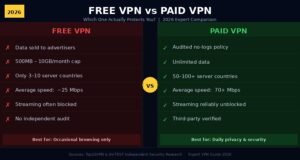
Free VPNs generate revenue somewhere. A 2023 investigation by Top10VPN found that a significant portion of free VPN apps on major app stores contained aggressive ad-tracking SDKs, and several well-known free VPNs were found selling user browsing data despite claiming no-log policies.
The economics are straightforward: if you’re not paying for the service, your data is the product. If budget is a real constraint, Proton VPN’s free tier is the only genuinely trustworthy free option — it’s funded by premium subscribers, has passed independent security audits, and offers unlimited bandwidth with no throttling.
3. Ignoring WebRTC leaks in your browser
WebRTC is a browser technology that enables real-time features like video calls and voice chat. It creates direct peer-to-peer connections that can bypass VPN tunnels and expose your real IP address to websites that query it — even when your VPN is fully connected.
In my testing, Chrome and Firefox users were affected by this on several mainstream VPN services without any warning. Fix: install uBlock Origin, which blocks WebRTC leaks by default. Firefox users can also disable it manually by setting media.peerconnection.enabled to false in about:config. Mullvad Browser disables WebRTC entirely out of the box and is the most privacy-hardened mainstream browser currently available.
4. Staying logged in during a private session
This is the single most common mistake — and the one with the most significant consequences. You can mask your IP perfectly and still be fully identifiable if you’re logged into Google, Facebook, Twitter/X, or any other authenticated service. Those platforms track your activity at the account level, and your login overrides everything else.
The practical fix: separate your private browsing from your authenticated browsing. Use a dedicated browser (Firefox with strict settings, or Mullvad Browser) for anonymous sessions, and keep logged-in accounts in a completely separate browser profile that you never cross-contaminate.
5. Forgetting about IPv6
Most people think of IP addresses in IPv4 format (203.0.113.42). Modern internet connections also carry an IPv6 address — a longer string like 2001:db8:85a3::8a2e:370:7334. Many VPNs mask IPv4 while leaving IPv6 completely unprotected.
Any website that supports IPv6 — which includes virtually every major platform — will see your real address even when your VPN shows a green connected status. Before committing to a VPN provider, confirm their documentation explicitly covers IPv6 leak protection. Test your live connection at ipleak.net, which shows both IPv4 and IPv6 addresses side by side.
6. Trusting an unverified no-logs claim
Nearly every VPN provider claims to keep “no logs.” A fraction have actually been audited to verify that claim, and fewer still have had it tested by real-world legal pressure.
The providers worth trusting are those with published, independent third-party security audits and a demonstrated track record: when their servers were seized by law enforcement, authorities received nothing because there was nothing to hand over. NordVPN, Mullvad, and Proton VPN have public records of this. That’s a meaningful differentiator from providers whose no-logs policy exists only in marketing copy.
Frequently Asked Questions
Is it legal to hide your IP address in the United States?
Yes, completely legal. VPNs, proxies, and Tor are legitimate privacy tools throughout the US. Using them to commit crimes is still illegal — but the tools themselves carry no legal risk for ordinary privacy protection use.
Will a VPN noticeably slow down my internet connection?
With a quality paid VPN using WireGuard protocol, the speed overhead is typically 5–20% — invisible for browsing, streaming HD video, and video calls. Very slow base connections and distant server locations will feel the impact more than fast connections with local servers.
Can my ISP see what I’m doing when I use a VPN?
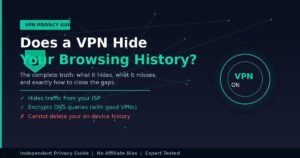
Your ISP can see that you’re connected to a VPN server and can see the volume of data transferred, but cannot see your traffic content, the websites you visit, or anything you do inside that tunnel. All they receive is encrypted data flowing between your device and the VPN server.
Does using Tor make me completely anonymous online?
Tor provides very strong anonymity but not absolute protection. Logging into personal accounts, downloading files, or running JavaScript can all compromise your identity. Your ISP can also detect Tor usage even without seeing your traffic, which is worth knowing in countries or contexts where Tor use itself raises flags.
What’s the most affordable way to hide my IP address effectively?
Proton VPN’s free tier is the only trustworthy free option — genuinely unlimited bandwidth and independently audited. For paid service, Mullvad costs approximately $5 per month, requires no account or email address, and accepts cash and cryptocurrency. Both have been externally audited.
Final Thoughts
Protecting your IP address is one of the most direct, practical privacy steps you can take — and far simpler to execute than most people assume. A reputable paid VPN handles the majority of real-world exposure: ISP surveillance, public Wi-Fi risks, location-based targeting, and advertiser tracking across the web.
Start here, right now: Open dnsleaktest.com and run a quick test on your current connection. If you see your ISP’s DNS servers in the results, your browsing is already leaking data even if you have some protection active. Pick one of the audited VPN providers named in this guide, enable the kill switch and DNS leak protection, and run the test again.
For higher-risk privacy needs, add the Tor Browser for sensitive sessions, use Mullvad Browser to reduce fingerprinting exposure, and keep all authenticated accounts in a browser profile that never touches your private sessions.
Your IP address is visible to the internet by default. It takes about five minutes to change that.
Smarter reading leads to smarter living—check out our top knowledge picks.