
What Does a VPN Actually Do to Your Home Network?
A VPN encrypts your internet traffic and routes it through a remote server before it reaches the websites you visit. Your internet provider sees a connection to the VPN server — not to the sites you use — and those sites see the VPN server’s IP address instead of yours.
That’s the core function. Here’s what a VPN does not do, because most people get this part wrong.
A VPN does not protect you from phishing attacks, malware, or data breaches at the sites you visit. It does not make you anonymous — your VPN provider can still see your traffic. And it doesn’t compensate for weak router passwords, outdated firmware, or reused login credentials. Those are separate problems that need separate solutions.
How Your Home Network Traffic Actually Flows
Your home router connects every device on your network to the internet through your ISP (Internet Service Provider). Without a VPN, your ISP can log every domain name your devices connect to. Not the actual content of those connections — HTTPS encryption handles that — but the destinations.
Your ISP knows you visited WebMD at 11pm. They know which news outlets you follow, which streaming services you use, and roughly how long you spend on them. They don’t see the articles you read or what you searched for, but they see exactly where you went.
With a VPN running, your ISP sees only a single connection to the VPN server. All domain lookups and site connections happen from the VPN’s end. Your browsing destinations disappear from your ISP’s visibility entirely.
WireGuard vs. OpenVPN: The Protocol Gap
Modern VPN providers now support WireGuard, a protocol the Electronic Frontier Foundation has noted has a codebase roughly 70,000 lines shorter than OpenVPN. Fewer lines of code mean fewer places for vulnerabilities to hide and a more auditable protocol overall.
In practice, WireGuard is meaningfully faster and reconnects after network interruptions more cleanly than OpenVPN. If a provider you’re evaluating still relies exclusively on OpenVPN in 2025, their infrastructure hasn’t kept pace. IKEv2 is a solid alternative, particularly on mobile devices that switch frequently between WiFi and cellular.
The Part No VPN Ad Will Tell You
When you use a VPN, you’re not eliminating a data-collection risk — you’re transferring it. Instead of your ISP seeing your traffic, your VPN provider does. You’re swapping one entity’s access for another’s. This is why no-logs policies matter, and why independently audited no-logs policies matter far more than the policies themselves.
When a Home VPN Is Actually Worth the Cost
There are specific situations where a VPN subscription earns its fee every month. If one or more of these apply to you, it’s a reasonable investment.
Your ISP Can Sell Your Browsing Data
In 2017, the U.S. Congress voted to overturn FCC privacy rules that would have required ISPs to get explicit customer consent before selling browsing data to advertisers. That decision hasn’t been reversed. U.S. internet providers can legally build profiles from your browsing habits and sell them.
Your ISP sees every device on your home network — your phone, your kids’ tablets, your smart TV, your router traffic collectively. A VPN configured at the router level covers all of them without requiring apps on each device. For families with multiple devices, that’s often the most practical approach.
This is probably the strongest real-world argument for a VPN at home for U.S. residents. The threat is legal, documented, and ongoing — not hypothetical.
You Stream Content From Other Countries
This is the most common reason people use home VPNs, and one of the few areas where the marketing accurately represents what the technology does. Netflix, BBC iPlayer, Disney+, and major sports streaming services license content by geographic region. A server in the target country lets you access that library as if you were there.
In my own testing, ExpressVPN and NordVPN reliably unlocked BBC iPlayer through UK servers and US Netflix from outside the country. Consistency varies heavily by provider — streaming services actively block VPN IP ranges, and providers that don’t rotate their server pools frequently stop working within a few months. Budget or free VPNs typically fail at this because they can’t afford to keep refreshing blocked IPs.
You Handle Sensitive Professional Data From Home
Remote workers and freelancers processing client financial documents, health records, or legal files have a stronger case for an encrypted home connection than casual browsers do. Employers typically require a corporate VPN for this reason. Self-employed professionals often don’t have that infrastructure in place and benefit from adding it.
If your work touches data covered by HIPAA, GDPR, or CCPA, encrypting your home connection with a reputable provider is practical risk management — not excessive caution.
You Use BitTorrent or P2P Networks
Torrent traffic is visible to your ISP. In many countries, copyright enforcement organizations actively monitor public torrent swarms and record IP addresses for infringement notices. A VPN with a verified no-logs policy puts the VPN server’s IP in those records, not yours.
“Verified” is the operative word. Mullvad and ProtonVPN have both had no-logs claims confirmed by independent security audits. Mullvad’s was tested more definitively than most: Swedish police seized servers from a Mullvad data center in 2023 and found no user data whatsoever. That’s a different class of evidence than a company’s policy document.
You Have a Lot of Smart Home Devices
Smart speakers, connected cameras, thermostats, and appliances often communicate with remote servers in ways that are genuinely hard to audit or control. A VPN at the router level encrypts all of that traffic in transit. It doesn’t stop a device from phoning home to its manufacturer — but it prevents your ISP from logging those communications and building behavioral patterns from them.
Your ISP can infer more than most people realize from smart device connection timing and frequency. A VPN removes that visibility.
When You Probably Don’t Need a VPN at Home
This is where most VPN marketing becomes misleading. Home networks are already significantly more secure than the environments where VPNs genuinely shine.
Your Home Router Isn’t a Coffee Shop Network
The scenario most VPN ads implicitly reference — a hacker intercepting your traffic on an open network — is a real risk on public WiFi. Coffee shops, hotel lobbies, airports, and transit hubs. On those networks, a VPN is genuinely useful and I wouldn’t skip it.
Your home router with WPA3 (or WPA2) encryption and a non-default password is a completely different environment. Nobody is sitting outside your house capturing packets off your WiFi. The primary attack vector that justifies VPN use on public networks simply doesn’t apply at home in the same way.
HTTPS Already Encrypts What You’re Actually Doing
Google’s Transparency Report shows that approximately 95% of web traffic used HTTPS as of 2024. The actual content of your browsing — what you read, what you type, your login credentials, your messages — is encrypted end-to-end by HTTPS regardless of whether you’re running a VPN.
What HTTPS doesn’t conceal is the destination: which domain you connected to. A VPN adds that metadata layer on top. Whether protecting destination metadata from your ISP is worth $5–12 a month is a personal judgment call, not a universal security requirement.
A VPN Won’t Protect You From the Threats That Actually Hit Home Users
The most common ways real home users get compromised: phishing emails that steal login credentials, reused passwords exposed by data breaches, malware bundled with downloaded software, and unpatched devices running software with known vulnerabilities.
A VPN addresses exactly none of these. If these are your security concerns — and statistically, they should be — a password manager and two-factor authentication on your accounts will do more for your actual security posture than any VPN subscription. Those two things first, always.
How to Choose a VPN That’s Actually Trustworthy
The VPN market is overcrowded and heavily influenced by affiliate marketing. Many providers that dominate “best VPN” listicles pay substantial commissions to publishers. Here’s what to evaluate independently of those incentives.
The Non-Negotiables
Audited no-logs policy. Any company can write a privacy policy. What matters is whether an independent security firm has reviewed the actual server infrastructure and confirmed it matches the claims. Look for publicly available audit reports from Cure53, Deloitte, KPMG, or Securitum. The report itself should be downloadable — not just referenced in a blog post.
WireGuard support. WireGuard is faster, more secure by design, and well-reviewed by the independent security community. IKEv2 is acceptable on mobile. OpenVPN-only providers are using protocol infrastructure that’s a decade old.
Kill switch. If the VPN connection drops unexpectedly, a kill switch cuts your internet access rather than letting traffic revert to your unencrypted ISP connection. This should be enabled by default. If it’s buried in advanced settings, that’s a warning sign about how the provider thinks about user security.
DNS leak protection. Without this, DNS queries can bypass the VPN tunnel and expose the domains you visit to your ISP even while the VPN is supposedly running. Check your provider at dnsleaktest.com after connecting to verify nothing is leaking.
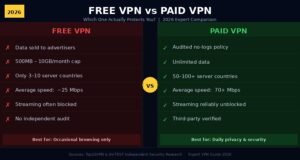
Why Free VPNs Are Mostly a Bad Idea
A 2020 study from CSIRO (Australia’s national science agency) and the University of New South Wales analyzed 283 free VPN Android apps. The findings: 38% contained malware or malware signatures, and 72% embedded third-party tracking libraries. Free VPN providers need to generate revenue, and when you’re not paying, the product model often involves your data — the exact thing you were trying to protect.
Two exceptions worth knowing: ProtonVPN’s free tier (unlimited data, three server locations, fully audited) and Windscribe’s free plan (10 GB per month). Both have years of transparent privacy practices behind them and have earned genuine trust from the security community. If you want to experience what using a VPN at home actually feels like before committing to a paid plan, start with ProtonVPN Free.
Top VPN Services for Home Use — Compared
| Provider | Annual Price | Servers | Audit Firm | Protocol | Best For |
|---|---|---|---|---|---|
| NordVPN | ~$3.99/mo | 6,400+ | PwC | WireGuard (NordLynx) | Streaming + everyday use |
| Mullvad | $5.50/mo flat | 700+ | Cure53 | WireGuard | Privacy-first users |
| ExpressVPN | ~$6.67/mo | 3,000+ | KPMG | Lightway (WireGuard-based) | Speed + streaming reliability |
| ProtonVPN | Free–$9.99/mo | 4,000+ | Securitum | WireGuard | Privacy + free tier option |
| Surfshark | ~$2.49/mo | 3,200+ | Deloitte | WireGuard | Budget + unlimited devices |
Annual billing rates as of 2025. Month-to-month pricing is substantially higher for all providers.
Mullvad is worth a specific mention: they accept cash and cryptocurrency, don’t require an email address to create an account, and generate only a random account number — no personal information tied to your subscription at any point. For users who treat privacy as the primary goal rather than an added feature, that structure matters.
How to Set Up a VPN on Your Home Router
Router-level setup covers every device on your network automatically — game consoles, smart TVs, IoT devices, anything that connects to your WiFi without native VPN app support.
- Check your router’s VPN client support. Asus routers running Merlin firmware, GL.iNet routers, and many Netgear Nighthawk models support WireGuard or OpenVPN client mode natively. Check your model’s spec page or look for a VPN section in the admin panel.
- Access your router’s admin panel. Open a browser and go to 192.168.1.1 or 192.168.0.1 — whichever is your router’s admin address. It’s usually printed on the router itself.
- Download config files from your VPN dashboard. Log into your VPN account online and download WireGuard (.conf) or OpenVPN (.ovpn) configuration files for the server locations you want.
- Upload and activate the config. Navigate to the VPN client section in your router settings, upload the config file, save, and enable the connection.
- Verify the setup. Visit ipleak.net. Your IP address should show the VPN server’s location. Run the DNS leak test on the same page to confirm no queries are escaping the tunnel.
If your current router doesn’t support VPN client mode, a GL.iNet travel router — the Beryl AX starts around $50 — sits between your modem and existing router and handles all VPN routing without requiring you to replace your main router.
Frequently Asked Questions
Does a VPN slow down my home internet? Yes, but the impact depends on the protocol and your base speed. WireGuard-based VPNs typically reduce speeds by 10–20% on fast connections. On a 200 Mbps or faster line, most users won’t notice the difference during normal browsing or streaming. OpenVPN connections can see larger drops, sometimes 30–50%.
Can my ISP tell I’m using a VPN? Your ISP can see that you’re connected to a VPN server and how much data is flowing, but not the content or destinations of that traffic. Some ISPs throttle known VPN traffic, but most consumer providers in the US don’t actively interfere with home VPN use.
Does a VPN protect every device in my home? A VPN app only protects the specific device it’s installed on. To cover all devices — smart TVs, gaming consoles, voice assistants — you need to configure the VPN at the router level, which automatically routes all network traffic through the encrypted tunnel.
Is using a VPN at home legal in the US? VPNs are fully legal in the United States for personal use. Some countries restrict or prohibit VPN use — China, Russia, and Iran are the most commonly cited examples — but US residents face no legal restrictions on home VPN use for lawful activity.
How much should a trustworthy VPN actually cost? Reputable subscriptions on annual plans typically range from $2.49 to $9.99 per month. Mullvad’s flat $5.50/month rate is a useful benchmark. Anything free (outside ProtonVPN and Windscribe’s limited plans) should be treated with skepticism. Anything priced well above $10/month without a clear infrastructure justification is likely charging for marketing, not better service.
Final Take
Do you need a VPN at home? If your ISP’s access to your browsing metadata concerns you, you want to stream content libraries from other countries, you handle sensitive professional data from a home office, or you want router-level protection across all your smart home devices — a paid VPN subscription is a reasonable purchase.
If your primary security concern is malware, account takeovers, or phishing, a VPN won’t help with any of that. A password manager and two-factor authentication on your critical accounts will protect you far more effectively against the attacks that actually compromise home users.
For most people, ProtonVPN’s free tier is the right starting point. Run it for a few weeks. See whether the speed impact is acceptable and whether the server locations cover what you need. If they do, upgrade. If not, you’ve learned something useful without spending anything.
When you go paid, choose a provider with a publicly available third-party security audit — not just the one with the loudest ad spend.
Push your limits with our challenge-driven blog posts made for go-getters.