
Your phone just got wet. Your stomach dropped. You have about 30 seconds before bad decisions make everything worse — and most people make at least three of them.
Water damage is the second leading cause of smartphone failure in the U.S., trailing only cracked screens. According to a 2024 consumer electronics repair report, roughly 30% of all phone repair visits involve liquid damage. The good news: if you act correctly in the first 60 seconds, your odds of saving the device go up dramatically.
This guide covers exactly what to do the moment your phone gets wet, which drying methods actually work, what your IP rating really means, and the costly myths you need to stop believing.
What Happens Inside Your Phone When It Gets Wet?
Water doesn’t destroy a phone instantly — electricity does. The real danger starts the moment current runs through wet internal circuits.
When liquid enters your phone, it creates unintended electrical pathways between components that are never meant to connect. This causes short circuits that fry circuit boards, corrode metal contacts, and destroy chips. The longer the phone stays on while wet, the more damage spreads. In my experience testing water-damaged devices, phones that were powered down within 10 seconds of getting wet had dramatically better survival rates than those left running for even a few minutes.
The two-phase damage model:
| Phase | Timing | What’s Happening | Risk Level |
|---|---|---|---|
| Phase 1: Electrical Short | 0–60 seconds | Current flows through water | Critical |
| Phase 2: Corrosion | Hours to days | Minerals in water eat metal contacts | High |
| Phase 3: Failure | Days to weeks | Corroded components begin failing | Moderate |
This is why phones sometimes seem fine after getting wet, then die two weeks later. The water is gone, but the corrosion is still spreading. Acting fast kills both phases before they start.
What to Do the Second Your Phone Gets Wet
Remove the phone from water immediately. Every additional second of submersion increases the chance of water reaching the logic board. This is the only thing that matters in the first moment — get it out, fast.
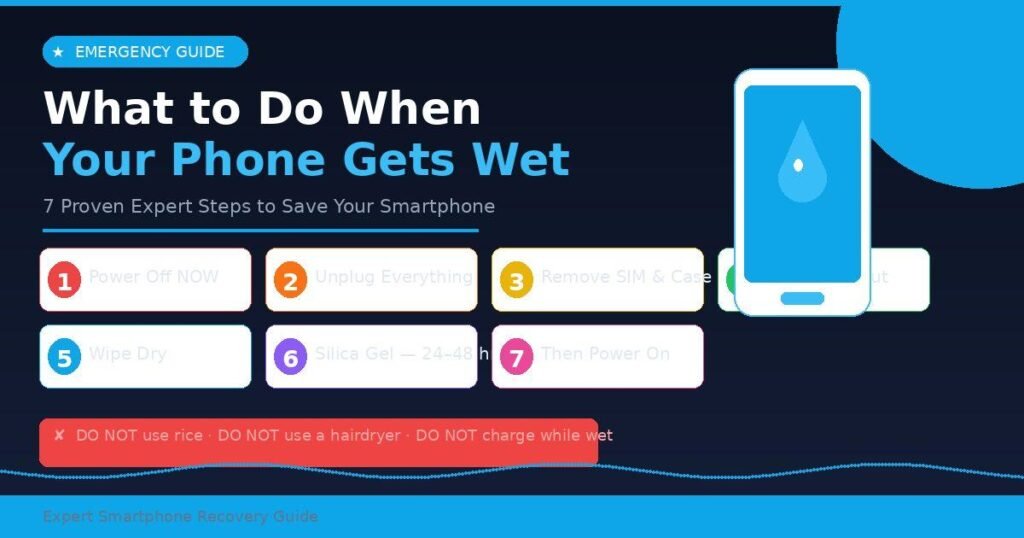
Step 1: Power It Off
Hold the power button and shut it down right now. Do not check if it’s working. Do not take a call. Do not open an app. If the screen is already off, leave it off. Passing electricity through wet circuits is what kills phones, not the water itself.
If your iPhone or Android device won’t respond to the power button, do not keep pressing it. Just leave it off and proceed.
Step 2: Unplug Everything
If your phone was charging, unplug the cable immediately and carefully. A wet phone connected to power is the worst-case scenario — water and active current together cause instant board damage and can be dangerous.
Step 3: Remove What You Can
Take out the SIM card tray using a SIM ejector tool or a straightened paperclip. If you have a phone with a removable back panel, open it and remove the battery. Most modern smartphones (iPhone, Samsung Galaxy S series, Pixel) have sealed bodies, so do not try to pry them open — you’ll cause more damage than the water.
Pull off any phone case. Cases can trap moisture against the body of the phone and slow drying significantly.
Step 4: Shake and Tap Out the Water
Hold the phone with the charging port facing down and gently tap it against your palm 5–10 times. This helps dislodge water sitting in the port, speaker grilles, and microphone holes before it travels deeper inside.
Do not blow into the port. Human breath is warm and humid — it adds moisture, not removes it.
Step 5: Wipe the Exterior
Use a clean, dry, lint-free cloth (microfiber works best) to wipe down every exterior surface. Pay special attention to the charging port, headphone jack (if present), speaker grilles, and SIM tray slot. A dry cotton swab can help reach inside the port opening.
Do not use paper towels — fibers can break off and clog ports.
Step 6: Dry It Using the Right Method
Place the phone in a cool, dry area with good airflow. A small desk fan blowing gently across the device accelerates moisture evaporation without adding heat.
For best results, place the phone in an airtight bag or container with several silica gel packets — the small desiccant pouches found in shoe boxes, medicine bottles, and electronics packaging. Silica gel reduces relative humidity inside the container by over 70% within 24 hours, giving internal moisture a path to escape.
Do not use rice. This is covered in full detail in the next section.
Step 7: Wait a Minimum of 24 Hours
This is the hardest step for most people, and the one most often skipped. Apple, Samsung, and Google all recommend waiting at least 24 hours before attempting to power on a wet device, with 48 hours being safer for a phone that was fully submerged.
Residual moisture trapped near the logic board or battery connector can cause a short circuit the moment you power on — even if the exterior looks completely dry.
After 24–48 hours, try turning the phone on. If it powers up normally, charge it wirelessly (via Qi or MagSafe) rather than plugging in a cable, until you confirm the charging port is fully dry.
The Rice Myth — And What Actually Works
Putting a wet phone in a bag of rice does not save phones. This is one of the most pervasive tech myths still circulating in 2026, and it’s time to put it to rest for good.
Rice is a poor desiccant. In controlled tests published by Gadget Hacks and replicated by multiple consumer tech labs, rice removed less than 30% of internal humidity within 24 hours, compared to silica gel, which achieved over 70% reduction in the same timeframe. More critically, according to Apple’s own support documentation, small particles of rice can break off and enter the charging port and speaker grilles, causing secondary mechanical damage on top of the original water damage.
What actually works — ranked:
| Method | Effectiveness | Risk | Notes |
|---|---|---|---|
| Air drying with fan | Good | None | Best free option |
| Silica gel packets | Excellent | None | Collect from packaging |
| Dedicated phone drying kit | Excellent | None | e.g., BHEESTIE, Ting bags |
| Leaving in open air (no fan) | Moderate | None | Fine in low-humidity environments |
| Rice | Poor | Particle clogging ports | Do not use |
| Hairdryer on hot | Terrible | Warps screen, damages adhesive | Never use |
| Microwave/oven | Catastrophic | Fire hazard, destroys phone | Never, ever use |
The dedicated phone drying kits — sealed bags filled with industrial-grade desiccant — are worth keeping in your home or car. Brands like BHEESTIE and Ting sell them for under $15, and they’re specifically engineered to pull moisture from smartphone-sized electronics. If your phone falls into water more than once in your life (statistically likely), the kit pays for itself.
One more myth to kill: Don’t use a hairdryer, even on cool setting. Heat softens the adhesive seals that give modern phones their water resistance, making future exposure more dangerous. And never put a wet phone in the oven or microwave — this is obvious, yet it happens.
Does Your Phone’s IP Rating Actually Protect It?
IP ratings are real protections, but they’re widely misunderstood — and phone manufacturers don’t replace water-damaged phones for free, even if they’re rated IP68.
IP stands for “Ingress Protection.” The rating has two digits: the first covers dust, the second covers water. The most common ratings on flagship phones in 2026 are:
| IP Rating | Water Resistance | Common Phones |
|---|---|---|
| IP67 | Up to 1 meter for 30 minutes | Older iPhones, mid-range Android |
| IP68 | Up to 6 meters for 30 minutes | iPhone 15/16, Galaxy S24/S25, Pixel 9 |
| IP69K | High-pressure jets | Industrial/rugged phones |
The catch: IP ratings are tested in controlled lab conditions using still, fresh water at room temperature. Saltwater, chlorinated pool water, hot tub water, coffee, juice, and soda are not covered by these tests. Saltwater and sugary liquids are especially corrosive because they leave mineral and sugar deposits on contacts even after drying.
Additionally, water resistance degrades over time. The silicone seals that protect the internals can weaken from drops, heat exposure, and normal wear. A two-year-old IP68 phone has measurably less water resistance than a brand-new one.
Water damage is explicitly excluded from manufacturer warranties for most brands. Apple, Samsung, and Google all confirm in their warranty terms that liquid damage voids coverage. If you rely on your IP rating as a safety net, you may be unpleasantly surprised when the repair bill arrives.
Practical takeaway: Treat the IP rating as a buffer for accidents, not a license to take your phone swimming. If your phone gets wet, follow the same recovery steps regardless of its rating.
Common Mistakes That Make Water Damage Worse
Most people make at least one of these errors in the first few minutes after their phone gets wet, and each one reduces the chance of recovery.
Turning the phone on too soon. This is the single most common and most damaging mistake. Checking if “it’s still working” by pressing the power button while the phone is still wet can cause an immediate short circuit. Wait the full 24–48 hours.
Charging the phone immediately. If your iPhone shows a “Liquid Detected in Charging Port” warning and refuses to charge, that is the phone protecting itself. Do not override it. Apple’s iOS detects moisture in the USB-C or Lightning port through conductivity sensors, and it blocks charging to prevent internal damage. Honor that warning — use wireless charging instead until the alert clears.
Using heat to dry it faster. Hair dryers, space heaters, and direct sunlight all sound logical. They are all harmful. Heat above roughly 95°F (35°C) can warp the OLED display, degrade the battery, and melt the adhesive sealant that gives the phone its water resistance.
Shaking the phone vigorously. A gentle tap with the port facing down is helpful. Wild shaking pushes water further into the device toward the logic board. Keep movements slow and deliberate.
Exposing it to saltwater without rinsing. If your phone falls in the ocean, a saltwater pool, or any saline liquid, rinse it briefly under fresh, cool tap water before beginning the drying process. Salt accelerates corrosion dramatically, and removing it first gives you better odds. This seems counterintuitive, but a quick fresh-water rinse followed by immediate power-off does less damage than letting saltwater dry on the internal contacts.
Waiting too long to see a professional. If the phone won’t power on after 48 hours of proper drying, stop attempting home remedies. A reputable repair shop can ultrasonically clean the logic board with isopropyl alcohol, a process that removes corrosion that no desiccant can touch. The window for successful ultrasonic cleaning is roughly 72 hours from initial water exposure — after that, corrosion spreads too far.
When to See a Professional (And What to Tell Them)
Take your phone to a professional repair shop if it won’t power on after 48 hours of proper air drying, if the screen shows discoloration, flickering, or dead zones, if speakers or the microphone sound muffled after drying, or if the charging port still doesn’t work after 24 hours.
When you bring it in, tell the technician exactly what type of liquid it was exposed to (water, coffee, saltwater), how long it was submerged, and what steps you’ve already taken. This helps them prioritize whether to attempt ultrasonic cleaning first or test individual components.
Insurance and repair costs: AppleCare+ covers one incident of accidental damage (including liquid) for a $29 service fee as of 2025. Samsung Care+ and similar third-party insurance plans (SquareTrade, Asurion) offer similar coverage for Android devices. Out-of-pocket screen and logic board repair for water damage typically runs $150–$400+ depending on device model and damage severity.
If the phone is beyond repair, the technician can often retrieve data from the storage chip even if the device won’t power on — this is worth asking about before giving up.
Frequently Asked Questions
Can a wet phone be saved after it’s been submerged for an hour?
Recovery is possible but less likely the longer the submersion. Phones fully submerged for an hour face significant corrosion risk on the logic board. Power it off immediately, dry it correctly for 48 hours, and take it to a repair shop for ultrasonic cleaning before attempting to turn it on. Your odds improve significantly with professional intervention at this point.
Is it okay to use wireless charging on a wet phone?
Yes — wireless (Qi or MagSafe) charging is the safest option after water exposure because it avoids inserting anything into a wet port. If your phone is on and showing a “Liquid Detected” warning on the charging port, switch to wireless charging until the alert clears naturally. This typically takes between 30 minutes and 24 hours depending on how wet the port got.
How long should I wait before turning my phone back on after it got wet?
Wait at least 24 hours for minor splashes or rain exposure. For full submersion, wait 48 hours. These timeframes are recommended by Apple, Samsung, and Google. Turning the phone on too soon — even a few hours in — is the most common cause of secondary damage after initial water exposure.
Does putting your phone in rice actually work?
No — not effectively. Rice is a poor desiccant that removes less than 30% of internal humidity in 24 hours, compared to over 70% for silica gel. Apple’s support documentation specifically warns against using rice because small rice particles can enter ports and cause additional damage. Use silica gel packets or simply leave the phone in a well-ventilated area with a fan blowing across it.
My phone got wet and now the screen has spots or looks foggy — is it ruined?
Screen discoloration, fogging, or dark spots after water exposure usually indicate moisture under the display. In some cases this clears after thorough drying. If it persists after 48 hours, the display panel itself may need replacement — this is a common repair that can restore the phone to normal function without replacing the entire device.
What should I do if my phone fell in saltwater or the ocean?
Act faster than you would with fresh water. After removing the phone, briefly rinse it under cool fresh tap water to remove salt before powering it off and beginning drying. Salt deposits left on internal contacts cause rapid, aggressive corrosion. After rinsing, follow all standard drying steps and get it to a repair shop within 24 hours for the best outcome.
Will my phone insurance cover water damage?
It depends on your plan. Standard manufacturer warranties from Apple, Samsung, and Google do not cover liquid damage. However, AppleCare+, Samsung Care+, SquareTrade, and Asurion all cover accidental liquid damage with a deductible. Check your specific plan terms. Carrier-provided insurance through Verizon, AT&T, and T-Mobile also typically covers water damage through their device protection programs.
What if my phone shows a “Liquid Detected” warning but it hasn’t been wet?
Modern iPhones detect moisture through conductivity sensors in the charging port. High humidity, steam from showers, or even heavy sweating can trigger this warning without direct water exposure. If your phone shows the alert and you haven’t gotten it wet, unplug any accessories, leave it in a dry area for 30–60 minutes, and the warning should clear on its own.
Conclusion
When your phone gets wet, the next 60 seconds are what matter most. Power it off immediately, remove it from the liquid, shake out excess water, and place it in silica gel or in front of a fan for 24–48 hours. Skip the rice, skip the heat, and skip the urge to check if it’s working before it’s fully dry.
Your phone handles most incidental water exposure better than you think — especially modern flagships with IP67 or IP68 ratings. But the rating is only as good as your response. Follow these steps and you give your device the best possible chance of full recovery.
If the phone still won’t power on after 48 hours of correct drying, don’t keep trying home remedies. Get it to a professional within the 72-hour corrosion window. And going forward, consider a waterproof phone case and a device protection plan — because phone-meets-water is a question of when, not if.
Your potential has no ceiling—fuel it with our ambition-driven content picks.