
Think about Netflix. You press play — a film starts instantly, in HD, with no download and no disc. Now think about Gmail. You log in from a different country on a borrowed laptop, and every email is right there. That’s cloud computing, quietly running behind almost everything you do online.
Cloud computing means accessing computing resources — storage, software, and servers — over the internet, instead of running them on your own machine. The resources live in massive data centers; you access them from anywhere.
This guide explains cloud computing in plain language: what it actually is, how it works step by step, the three main types, what it genuinely costs and saves, and the myths that trip people up. No jargon. No fluff. Just a clear picture of one of the most important shifts in how the modern world stores, processes, and shares information.
What Does “Cloud Computing” Actually Mean?
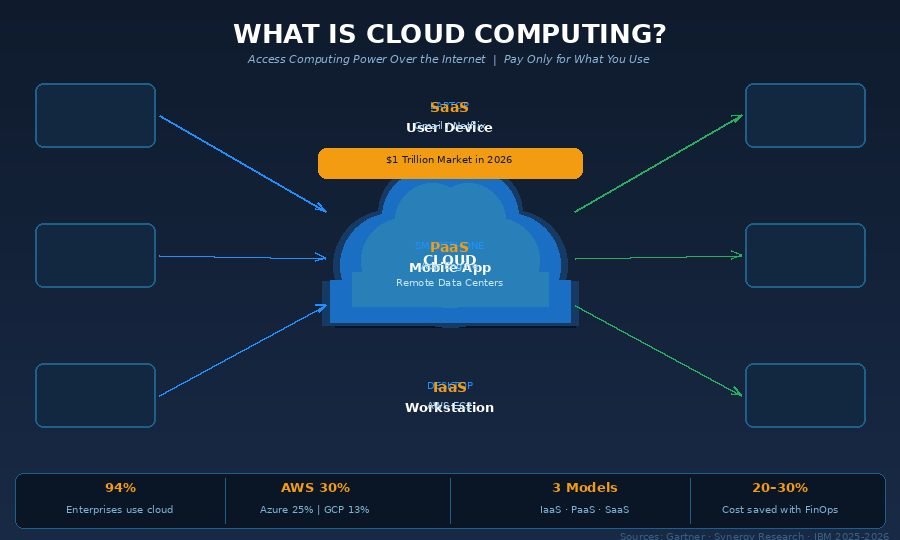
Cloud computing is the on-demand delivery of computing services — servers, storage, databases, software, networking — over the internet, typically on a pay-as-you-go basis. Instead of owning and maintaining physical hardware, you rent access to computing power from a provider who runs it for you.
The word “cloud” came from how engineers used to draw internet connections in technical diagrams — as a fluffy cloud shape representing the network between systems. The name stuck. In reality, there is no cloud. It’s someone else’s computer, in a warehouse-sized data center, connected to you through the internet.
The simplest analogy you’ll ever read
Before electricity grids existed, factories had to build their own power plants. That meant enormous upfront cost, full-time engineers to run the equipment, and power sitting idle most of the day. Then the public electricity grid arrived. Factories plugged in, used what they needed, and paid per unit consumed. Nobody builds their own power plant anymore.
Cloud computing did the same thing for computing power. Before the cloud, a company launching a product online had to buy physical servers, rent space in a data center, hire IT staff to maintain hardware 24/7, and wait 4–6 weeks before going live. With cloud computing, that same company provisions a server in 4 minutes, scales automatically when demand spikes, and pays only for what it uses — the rest of the time, it’s not their problem.
Why this matters right now
The numbers confirm this isn’t a niche technology. According to Persistence Market Research, the global cloud computing market reached an estimated $917.9 billion in 2026, with Synergy Research Group projecting it will cross $1 trillion before year-end. Gartner forecasts public cloud end-user spending alone at $850 billion in 2026 — a 21.3% jump from 2025. About 94% of enterprises now run workloads in the cloud in some form.
This scale happened because cloud computing solves a real problem: computing power has traditionally been expensive, fragile, and hard to scale. The cloud removes all three barriers.
A quick history note
Cloud computing didn’t appear overnight. The concept grew through the 1990s with virtualization technology, which allowed one physical machine to act like many. Amazon Web Services (AWS) launched in 2006 with its S3 storage and EC2 compute services — widely considered the moment cloud computing became a commercial reality. Microsoft Azure followed in 2010, and Google Cloud Platform grew significantly after 2013. Today, AWS holds approximately 30% of global cloud infrastructure market share, Azure at 25%, and Google Cloud at 13%, collectively controlling over 68% of enterprise cloud spending.
How Does Cloud Computing Actually Work?
Cloud computing works by connecting your device to powerful remote servers through the internet. Those servers do the heavy lifting — storing data, running software, processing requests — while your device acts as the interface you interact with.
Here’s the exact sequence when you open a file in Google Drive:
Step 1 — You send a request. You click a document. Your browser sends a request over the internet to Google’s nearest server cluster.
Step 2 — Authentication happens. Google’s systems verify your identity — are you logged in? Do you have permission to access this file? This takes milliseconds.
Step 3 — The server retrieves your file. A remote server locates your document in distributed storage — likely spread across multiple physical disks in the same data center for redundancy.
Step 4 — Data travels back to you. The server sends the file content to your browser. With a fast connection, this round trip happens in under 200 milliseconds.
Step 5 — Changes sync in real time. Every edit you make is continuously saved back to Google’s servers. Close the browser mid-sentence — when you reopen it, everything is there.
Step 6 — Any device, anywhere. Log in on a different laptop, your phone, or a tablet. Same file, same version, fully up to date.
What’s actually inside a cloud data center?
Cloud providers operate massive physical facilities — some larger than several football fields — packed with rows of servers, high-speed networking equipment, uninterruptible power supplies, and industrial cooling systems. Amazon Web Services alone operates across more than 100 availability zones in over 30 geographic regions worldwide.
The most underappreciated engineering detail is redundancy. Your data is not stored on one server. It’s replicated automatically across multiple machines, often in separate physical buildings within the same region. When one server fails — and hardware always eventually fails — another takes over without you noticing. That’s how cloud providers can credibly offer 99.99% uptime guarantees.
The internet connection you use is not a single pipe. Your request travels through multiple network nodes, routers, and undersea cables if needed, and cloud providers use Content Delivery Networks (CDNs) — servers placed physically close to users around the world — to reduce the distance data must travel. That’s why Netflix plays smoothly in Pakistan, Brazil, and Norway simultaneously from the same content library.
What Are the Three Main Types of Cloud Computing?
Not all cloud services work the same way. Cloud computing comes in three distinct service models, and understanding the difference determines which one actually fits your situation. Choosing wrong is one of the most expensive mistakes organizations make when adopting cloud.
| Service Model | What You Get | What Provider Manages | Ideal For |
|---|---|---|---|
| IaaS — Infrastructure as a Service | Raw servers, storage, networking | Physical hardware, data centers | Developers, IT teams needing full control |
| PaaS — Platform as a Service | Development environment | OS, runtime, middleware, hardware | App developers who want to ship fast |
| SaaS — Software as a Service | Ready-to-use application | Literally everything | Business users and individuals |
IaaS — Infrastructure as a Service
IaaS gives you raw computing building blocks: virtual servers, storage, and networking that you configure yourself. Think of it as renting an empty, fully powered building and furnishing it exactly how you want.
Real example: A data science company uses AWS EC2 instances to train machine learning models. For a three-day project, they spin up 300 virtual servers, run their workloads, then shut everything down. They pay for exactly 72 hours of compute time. Owning 300 physical servers for the same task would have cost millions in hardware alone. The leading IaaS providers are AWS, Microsoft Azure, and Google Cloud.
PaaS — Platform as a Service
PaaS removes the infrastructure management layer entirely. You get a pre-configured development environment where you deploy your code — the provider handles servers, operating systems, scaling, load balancing, and security patches.
Real example: A fintech startup builds a payment processing backend on Google App Engine. Their engineering team writes application code and deploys it. Google handles everything underneath: server provisioning, OS updates, automatic scaling when transaction volume spikes at month-end. The startup ships features six months ahead of competitors who were busy configuring servers. Common PaaS offerings include Heroku, Google App Engine, and Microsoft Azure App Service.
SaaS — Software as a Service
SaaS is what most people interact with every day, often without realizing it. You access fully built software through a browser or app. There is nothing to install, nothing to maintain, and nothing to configure on your end.
Real examples: Gmail, Microsoft 365, Slack, Zoom, Salesforce, Dropbox, Spotify, and Netflix — all SaaS products. The vendor manages every server, database, security patch, and feature update. You just log in and use the application. According to Fortune Business Insights, the global SaaS market was valued at $317.55 billion in 2024 and is projected to reach $1.23 trillion by 2032.
Deployment models: Public, Private, and Hybrid Cloud
Beyond the service model, cloud environments are deployed in three ways:
Public Cloud: Infrastructure owned and operated by a third-party provider (AWS, Azure, Google Cloud) and shared among multiple customers. Resources are logically separated — your data is isolated from other customers’ data — but you share the physical hardware. This is the most cost-effective model and is where most startups and growing businesses operate.
Private Cloud: Dedicated infrastructure used exclusively by one organization. This can sit in the organization’s own data center or be hosted by a third party, but the hardware isn’t shared. Banks, hospitals, and government agencies often require private cloud for regulatory compliance and data sovereignty reasons.
Hybrid Cloud: A combination of public and private cloud environments with orchestration between them. Sensitive customer data might live in a private environment, while marketing analytics and development workloads run on public cloud. As of 2026, approximately 87% of enterprises run multi-cloud strategies — using more than one cloud provider — to avoid vendor lock-in and match workloads to the best-suited platform.
Real Benefits, Hidden Costs, and Myths Worth Debunking
Cloud computing is both overhyped and underestimated. Here’s an honest account of what it actually delivers and where it falls short.
The genuine benefits
Scalability without capital investment: This is the cloud’s core advantage. A retail business running normal traffic on 10 virtual servers can automatically scale to 500 during a flash sale, then drop back to 10 the next morning. The same scenario on owned hardware would require buying 490 servers that sit idle 362 days a year. In 2025, a European e-commerce platform’s infrastructure scaled to handle 40 times normal traffic during a 4-hour sale — without a single engineer touching a server.
Speed to market: Teams that previously waited 6 weeks for hardware procurement now provision server environments in under 10 minutes. For developers, this removes the bottleneck between “idea” and “deployed, testable product.” The feedback loops shrink from months to days.
Reliability by design: Cloud providers guarantee uptime through Service Level Agreements — typically 99.9% to 99.99% availability. When a major AWS data center in Virginia experienced a weather-related outage, workloads automatically shifted to neighboring availability zones. Most customers noticed nothing. Their own servers would have gone dark.
Security at scale: This surprises many people, but cloud providers often deliver better security than small-to-medium organizations can afford on-premise. AWS, Azure, and Google Cloud each spend billions annually on security infrastructure, threat detection, compliance certifications, and penetration testing. IBM’s 2025 Cost of a Data Breach Report placed the global average breach cost at $4.44 million — organizations with mature cloud security practices consistently fall below that figure.
Pay only for what you use: Traditional IT required buying capacity for peak load — hardware sat underutilized the other 90% of the time. Cloud billing is granular: per second, per transaction, per gigabyte stored. Organizations using FinOps (cloud financial management) practices reduce cloud waste by 20-30% within their first year.
The real costs and trade-offs
Cloud is not automatically cheaper. I’ve analyzed businesses that migrated to cloud and tripled their monthly infrastructure costs — not because cloud is overpriced, but because they lifted and shifted without optimization. Idle servers, undeleted storage volumes, over-provisioned database instances, and redundant data transfers all accumulate silently.
The honest trade-off is control for convenience. In a private data center, you own every decision. In the cloud, you’re operating within a shared environment with constraints set by the provider. For regulated industries — healthcare, finance, government — this creates compliance complexity that a well-run private environment sometimes handles more cleanly.
There is also the vendor dependency question. Once your architecture is deeply integrated with proprietary AWS or Azure services, switching providers is expensive and time-consuming. 87% of enterprises run multi-cloud precisely because of this risk.
Four myths that won’t die
Myth 1: “The cloud is always cheaper.” Not without optimization. The pay-as-you-go model requires active management to stay economical. The savings are real when you replace idle physical hardware with elastic cloud resources. The savings disappear when you run cloud instances the same way you ran physical servers — always on, never resized.
Myth 2: “The cloud isn’t secure.” Misconfiguration causes 65% of cloud security incidents — not the infrastructure itself. An S3 bucket set to public by accident is a human error, not a cloud vulnerability. The cloud providers’ underlying infrastructure is among the most hardened computing environments on earth.
Myth 3: “Cloud is only for large enterprises.” A freelance photographer using Google Photos, a boutique store using Shopify, or a university student using Notion — all use cloud-based services. The model scales from a single user to a Fortune 500 organization. AWS’s free tier alone has allowed millions of developers and students to build projects that would have been financially impossible a decade ago.
Myth 4: “Once you’re in the cloud, you’re stuck.” Cloud repatriation — migrating workloads from public cloud back to owned infrastructure — is increasingly common and well-documented. It’s a business and cost decision that happens regularly. No technical lock prevents it; migration just requires planning and investment, the same as any infrastructure change.
Frequently Asked Questions About Cloud Computing
What is cloud computing in the simplest possible terms? Cloud computing means using the internet to access storage, software, and computing power that lives on remote servers — instead of running those things on your own device. You access the resources; someone else owns and manages the machines.
Is cloud computing the same as the internet? No. The internet is the global network connecting devices. Cloud computing is a service model that delivers computing resources over that network. The internet is the road; cloud computing is the service being delivered on it. You can use the internet without using cloud computing, but cloud computing requires the internet.
What are some everyday examples of cloud computing? Gmail, Google Drive, Netflix, Spotify, Dropbox, Zoom, WhatsApp (for message syncing), iCloud, OneDrive, and Microsoft 365. If an app stores your data online, works across multiple devices, and you’ve never installed a server in your house to make it work — it’s cloud computing.
Is it safe to store personal data in the cloud? For most personal use cases with reputable providers, yes. Reputable cloud services use encryption in transit and at rest, two-factor authentication, and regular security audits. The main risks for personal users are weak passwords and phishing attacks — not the cloud infrastructure itself.
Do I need technical skills to use cloud computing? As a consumer of SaaS products — Gmail, Netflix, Google Photos — no technical knowledge is required at all. Developers and IT teams working with IaaS and PaaS platforms do need technical expertise, but that applies equally to managing traditional on-premise infrastructure.
Conclusion
Cloud computing isn’t a technology buzzword or a distant enterprise concept. It’s the infrastructure running Gmail as you read emails, Netflix as you stream, and Google Maps as you navigate. It’s the reason a two-person startup can access the same computing power as a global corporation.
The core idea is simple: instead of buying and maintaining your own computing infrastructure, you rent it over the internet and pay for what you use. The provider manages the hardware, the redundancy, and the security. You focus on what you actually want to build or accomplish.
With the global cloud market approaching $1 trillion in 2026 and 94% of enterprises already on board, cloud computing is no longer optional infrastructure — it’s the default. The only question is how you use it.
Your next step: If you’re curious to move from reading to hands-on experience, both AWS and Google Cloud offer free tiers — no credit card required for basic services — that let you explore real cloud environments at zero cost. Spin up a virtual server, create a storage bucket, deploy a basic app. The concept clicks fastest when you’ve actually done it.
Tired of surface-level content? Our in-depth expert posts go all the way.