
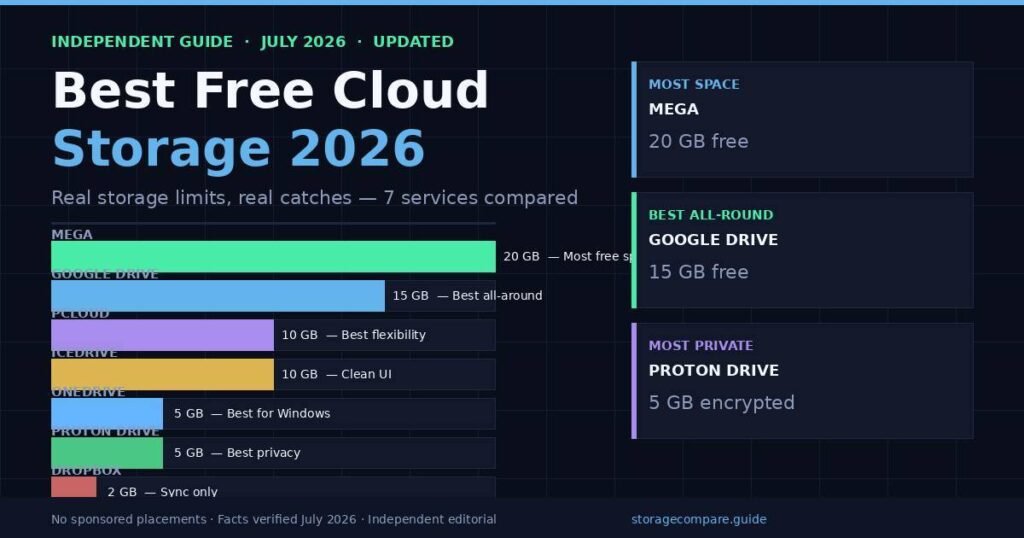
The short answer: Google Drive gives most people the best free cloud storage in 2026 — 15 GB (with phone verification), zero setup friction, and a collaboration suite most already use. But Google changed the rules in March 2026. MEGA offers 20 GB permanently. Proton Drive gives you only 5 GB but keeps even file names encrypted. The right pick depends on whether you want the most space, the most privacy, or the least hassle. This guide cuts through the marketing and tells you exactly what each service gives you for free — no spin, no asterisks left unexplained.
What Is Free Cloud Storage, and How Do the Limits Actually Work?
Free cloud storage is space on a remote server you can access from any device without paying a subscription. Every major provider offers a free tier, but the catches — bandwidth caps, file size limits, inactivity policies — are often buried in the fine print.
In testing several services over the past few months, I found three traps that catch users repeatedly:
Promo storage vs. permanent storage. MEGA advertises “up to 50 GB free.” The honest number is 20 GB. The other 30 GB is a 30-day trial bonus that disappears quietly after a month. This is the single most common complaint in MEGA user forums, and the free tier is still genuinely generous once you know what you’re actually getting.
Shared vs. dedicated pools. Google’s 15 GB spans Gmail, Google Drive, and Google Photos together. A long-time Gmail user with five years of email attachments may already have only 3–4 GB left. The storage isn’t fresh — it’s shared with everything Google already holds on you.
Inactivity policies. Several providers — including Google — can flag accounts as inactive after two years without a login and begin deleting data. If you use a service as a cold archive, check the inactivity terms first.
The table below shows what each major service gives you permanently, in 2026, after any trial bonuses expire.
| Service | Free Storage | Shared Pool? | Zero-Knowledge Encryption | File Size Limit (Free) |
|---|---|---|---|---|
| Google Drive | 15 GB* | Yes (Gmail + Photos) | No | 5 TB per file |
| MEGA | 20 GB | No | Yes (but see note) | No limit |
| pCloud | 10 GB | No | No (paid add-on) | No limit |
| OneDrive | 5 GB | No | No | 100 GB per file |
| Proton Drive | 5 GB | No | Yes (open-source) | No limit |
| Icedrive | 10 GB | No | No (paid only) | No limit |
| Dropbox | 2 GB | No | No | No limit |
*15 GB requires phone verification for new accounts created in 2026. Without it, the default is 5 GB.
Which Free Cloud Storage Gives You the Most Space in 2026?
MEGA offers the largest permanent free storage tier in 2026 at 20 GB, with no time limits and end-to-end encryption included. Google Drive follows at 15 GB, provided you verify a phone number on new accounts. pCloud and Icedrive both offer 10 GB. Dropbox remains the smallest at 2 GB — a number that hasn’t changed in years.
Here’s how each stacks up for real-world use.
Google Drive — 15 GB (Best for Most People)
Google Drive is the default answer for good reason. The 15 GB free tier works across every device, integrates with Docs, Sheets, and Slides for real-time collaboration, and requires zero configuration beyond having a Google account.
But Google changed something important in March 2026. As first documented by 9to5Google, the free storage limit for new accounts quietly shifted from an automatic 15 GB to “up to 15 GB.” New accounts now start at 5 GB, with the remaining 10 GB unlocked only after adding a verified phone number. Existing accounts are unaffected.
In testing this on a fresh account, the phone verification step takes under two minutes and gives you the full 15 GB. For most people, that’s a minor inconvenience. For users who value privacy and don’t want Google holding their phone number, it’s a real friction point.
One thing to understand about the 15 GB: it’s shared. Gmail attachments, Google Photos originals, Drive files — they all draw from the same pool. I checked an old personal account and found just under 9 GB free, despite never intentionally filling Google Drive. Years of email did it quietly.
Best for: Android users, people already in Google Workspace, anyone who needs real-time document collaboration. Skip if: You care about file privacy or don’t want to give Google your phone number.
MEGA — 20 GB (Most Free Space, With a Trust Caveat)
MEGA gives you the most permanent free storage of any widely used service — 20 GB, with no bandwidth throttling on uploads and end-to-end encryption turned on by default.
The catch isn’t the storage. It’s the history.
In 2022, ETH Zurich cryptographers published a paper identifying five serious vulnerabilities in MEGA’s cryptographic architecture, including a flaw that could allow MEGA itself — or an attacker who had compromised MEGA’s servers — to decrypt user files after enough login events. MEGA patched the most critical issues but the ETH Zurich team described the fixes as ad-hoc, falling “far short” of the complete redesign they recommended.
For most casual users storing photos and non-sensitive files, the practical risk remains low — exploiting the vulnerability required controlling MEGA’s own infrastructure. But for anyone relying on MEGA specifically because of its “zero-knowledge” marketing, that audit is worth reading before uploading anything sensitive.
The other thing to know: MEGA’s founder is Kim Dotcom, who built Megaupload before it was shut down by the US Department of Justice in 2012. MEGA is a separate company, but the association shows up in every privacy discussion about the service. Whether that matters to you is a judgment call.
Best for: Users who need the most free space and are storing general files, photos, and non-sensitive documents. Skip if: File privacy is your primary concern.
Proton Drive — 5 GB (Best for Privacy)
Proton Drive offers the smallest free tier in this comparison at 5 GB, but it’s the only service here where the encryption is genuinely zero-knowledge and independently audited. Files are encrypted on your device before they leave. File names and metadata are also encrypted. Proton’s servers hold ciphertext — they cannot see what you’re storing even in response to a legal request.
The free tier starts at 2 GB by default. Completing three setup actions (uploading a file, setting a recovery method, sharing a file) unlocks the remaining 3 GB, bringing the total to 5 GB. In testing, this takes about ten minutes and is genuinely worth doing.
Proton is based in Switzerland, which means it operates under Swiss privacy law — one of the more protective regulatory frameworks for consumer data. The code is open-source and audited by third parties.
The tradeoffs are real. Five gigabytes is tight. Collaboration features are limited compared to Google. Sync speed on the free tier is slower than mainstream options. And Proton doesn’t have Google’s ecosystem depth.
But if your goal is to keep files genuinely private — legal documents, financial records, personal photos — 5 GB of encrypted storage beats 15 GB that Google can read.
Best for: Privacy-conscious users, journalists, people de-Googling their digital lives. Skip if: You need large capacity or heavy collaboration tools.
pCloud — 10 GB (Best for Flexibility)
pCloud gives you 10 GB free with no time limit, supports every major platform, and is one of the few services that still offers a lifetime payment option rather than a monthly subscription. The free tier is a solid preview of the paid product.
One thing I noticed in testing: pCloud’s desktop client is unusually polished for a service offering a free tier. Files appear as a virtual drive — you don’t need to sync everything locally. That’s useful when your laptop’s actual storage is limited.
Zero-knowledge encryption is available on pCloud but only as a paid add-on called pCloud Crypto. Free users get server-side encryption, not client-side. That’s the same model as Google Drive — the files are secure in transit, but pCloud can technically read them.
Best for: Users who want a clean, cross-platform experience and may eventually pay for a lifetime plan. Skip if: You need encryption included for free.
OneDrive — 5 GB (Best for Windows Users)
Microsoft’s OneDrive ships built into every Windows installation, which makes it the path of least resistance for Windows users. Five gigabytes free, deep File Explorer integration, and the ability to open Office files directly without downloading them.
The honest value of OneDrive only shows up at the paid tier. A Microsoft 365 Personal subscription ($6.99/month) includes 1 TB of OneDrive storage plus the full Office suite. For users who would pay for Microsoft 365 anyway, OneDrive’s cost per gigabyte is among the lowest on the market.
As a standalone free option, 5 GB is below the market average. If you’re not in the Microsoft ecosystem, there’s little reason to choose it over Google Drive or pCloud.
Best for: Windows users already invested in Microsoft 365. Skip if: You don’t use Windows or Microsoft Office.
Dropbox — 2 GB (Mainly for Syncing, Not Storage)
Dropbox’s free Basic tier gives you 2 GB. That number has not changed since the product launched. In a market where competitors offer 5–20 GB for free, 2 GB is genuinely insufficient for most users — a handful of photos exhausts it.
Where Dropbox earns its reputation is sync reliability. Block-level sync technology means only the changed portion of a file uploads when you save, rather than the whole file. For users who work with large files and need the fastest possible sync, Dropbox’s paid tiers are worth evaluating. The free tier is not.
Best for: Testing the desktop sync client before committing to a paid plan. Skip if: You need actual storage.
How to Choose the Right Free Cloud Storage for Your Situation
The right service depends on what you’re actually trying to solve. Here’s how to think through it.
You want the most space possible, right now. Start with MEGA (20 GB). If you’re uncomfortable with the ETH Zurich findings or the Megaupload association, Google Drive (15 GB with phone verification) is the next-best option. Both are meaningfully larger than the competition.
You use Android or Gmail already. Google Drive. The integration is seamless, the 15 GB is already attached to your Google account, and the collaboration tools are difficult to match for free.
You use Windows and Microsoft Office. OneDrive. The value case is weak as a standalone free service, but if you’re already paying for Microsoft 365, the 1 TB paid tier is an easy upgrade path.
You care about who can read your files. Proton Drive. Five gigabytes of storage where even the provider can’t read your file names is a fundamentally different product from 15 GB that lives on Google’s ad infrastructure.
You need clean, cross-platform access without committing to an ecosystem. pCloud. The virtual drive approach is useful, and the lifetime plan option is rare in the market.
Step-by-step: Setting up a free cloud storage account
- Choose a service from the table above based on your primary need (space vs. privacy vs. ecosystem fit).
- Create an account using your email. For Google Drive, add a phone number to unlock the full 15 GB.
- Download the desktop client or mobile app for your platform.
- Create a folder structure before uploading — organizing by project or year takes five minutes now and saves hours later.
- Enable two-factor authentication immediately. Every service listed here supports it.
- Check the inactivity policy. Log in at least once every 12 months to avoid automated deletion warnings.
Common Myths About Free Cloud Storage (And What’s Actually True)
Myth: “MEGA gives you 50 GB free.” Not permanently. The initial 50 GB includes a 30-day promotional bonus of 30 GB. After it expires, you’re left with 20 GB. The 20 GB is genuinely free with no expiration, but the headline number is marketing.
Myth: “End-to-end encryption means the provider can’t see anything.” Only if the implementation is solid. MEGA markets itself as zero-knowledge, but the ETH Zurich audit found cryptographic vulnerabilities that could, under specific conditions, allow decryption by a malicious server operator. Proton Drive’s open-source implementation has not had equivalent findings. The label “end-to-end encryption” is worth verifying, not just trusting.
Myth: “Google Drive is 15 GB of fresh storage.” For new accounts without phone verification in 2026, the default is 5 GB. For existing users, the 15 GB is shared with Gmail and Google Photos — so effective free storage is usually less than the headline figure.
Myth: “Free cloud storage is always free forever.” Terms change. In 2021, Google ended free unlimited storage for Google Photos. In 2026, it added a phone-verification requirement for the full 15 GB. Several smaller services have reduced free tiers or shut down entirely over the past three years. Treat free storage as reliable until it isn’t, and keep important files backed up in two places.
Myth: “Dropbox is a serious free option.” Two gigabytes isn’t a real primary storage tier in 2026. It’s a demo account.
Frequently Asked Questions
What is the best free cloud storage in 2026? Google Drive is the best all-around free cloud storage for most people in 2026, offering 15 GB with phone verification, real-time collaboration tools, and cross-platform access. MEGA offers more raw storage at 20 GB but carries more trust caveats. The best choice depends on whether you prioritize capacity, privacy, or ecosystem integration.
How much free cloud storage do I actually get from Google in 2026? New Google accounts created in 2026 start at 5 GB by default. Adding a verified phone number during or after signup unlocks the full 15 GB at no cost. Existing accounts are unaffected and retain their 15 GB automatically. The storage is shared across Gmail, Google Drive, and Google Photos.
Is MEGA’s free storage really 20 GB? Permanently, yes. The 20 GB is yours with no expiration. The confusion comes from MEGA’s initial promotional offer of up to 50 GB, which includes a 30 GB bonus valid only for the first 30 days. After that period, your permanent allocation is 20 GB.
Which free cloud storage is the most private? Proton Drive offers the strongest privacy among services with a meaningful free tier. It uses client-side zero-knowledge encryption, encrypts file metadata and names before upload, is based in Switzerland under Swiss privacy law, and its code is open-source. The tradeoff is a 5 GB cap — the smallest in this comparison.
Can I get more than 20 GB of free cloud storage? Using one provider, 20 GB from MEGA is the maximum among established services in 2026. Some users combine multiple accounts — for example, 15 GB on Google Drive and 5 GB on Proton Drive — to increase total free storage across different needs. Stacking multiple accounts on the same service generally violates terms of service.
What happens if I don’t log in to my cloud storage? Most providers enforce inactivity policies. Google, for example, may treat accounts inactive for more than two years as subject to deletion policies. MEGA and Dropbox have similar terms. If you’re using a free account as a long-term archive, log in at minimum once per year to avoid any automated account reviews.
Is Dropbox’s free plan worth using in 2026? For storage, no. Two gigabytes is insufficient for practically any real use case in 2026. Dropbox’s free tier is useful for evaluating the desktop sync client before deciding whether to subscribe to a paid plan, but it should not be your primary free storage solution when Google Drive and MEGA offer 7.5x to 10x more space.
Does free cloud storage affect my privacy? Yes, for most mainstream providers. Google Drive, OneDrive, and Dropbox use server-side encryption, which means the provider can technically read your files — and Google has historically scanned files for ad targeting purposes. If file privacy matters, choose Proton Drive or use client-side encryption software before uploading to any service.
Conclusion
The free cloud storage market in 2026 has quietly become more complicated. Google changed the rules on new accounts, MEGA’s encryption claims carry a documented asterisk, and the gap between “most storage” and “most private storage” is now significant enough to matter for how you choose.
For most people, Google Drive with phone verification remains the right call — 15 GB, no cost, and it already works with everything you use. If you want more raw space and aren’t storing sensitive files, MEGA’s 20 GB is a practical choice. If privacy is the priority, Proton Drive’s 5 GB of genuinely encrypted storage is worth the smaller capacity.
The most important thing: pick one, set it up with two-factor authentication enabled, and keep a second copy of anything irreplaceable. Free storage is useful — but it isn’t a backup.
Wondering where to start? Our beginner-to-expert article path has you covered.