
Your password is probably wrong — not because you’re careless, but because the rules you learned are outdated. The “8 characters with uppercase, a number, and a symbol” model that dominated cybersecurity advice for 20 years was officially retired by the U.S. National Institute of Standards and Technology (NIST) in 2025.
Modern GPU arrays now test 180 billion password guesses per second. AI-powered cracking tools already know every predictable substitution — P@ssword, Dr@gon, S3cur!ty — before you type them. And credential-stuffing attacks recycle databases of over 20 billion leaked passwords to break into accounts within seconds.
This guide covers exactly how to make a strong password using methods that hold up in 2026: the NIST-recommended 15-character minimum, the passphrase approach, the sentence method, and the three tools that do the heavy lifting for you.
What Actually Makes a Password Strong in 2026?
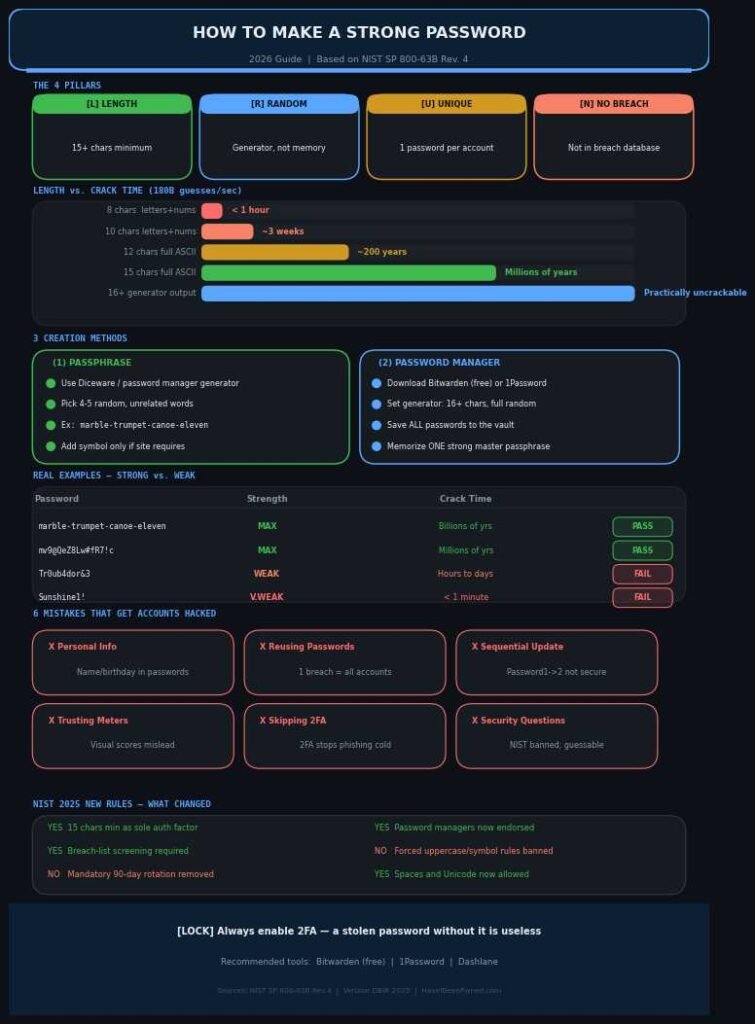
A strong password in 2026 has three core properties: it is long (at least 15 characters), unique to every account, and absent from every known breach database. Under NIST SP 800-63B Revision 4 — finalized in mid-2025 — complexity rules are no longer the primary standard. Length is.
This shift happened because forcing uppercase letters, symbols, and numbers creates predictable patterns, not genuine security. Users instinctively capitalize the first letter, append a number at the end, and swap “a” for “@”. Security researchers call these “mangling rules,” and every serious cracking tool applies them within milliseconds. The result: P@ssw0rd1 is nearly as weak as password1 because attackers have pre-computed every variation.
The second critical property is uniqueness. When a company is breached — and significant data breaches happen weekly — attackers immediately run stolen credentials against Gmail, bank portals, and e-commerce sites. If you reuse a password across two accounts, one breach becomes every breach. The 2025 Verizon Data Breach Investigations Report found that 88% of web application attacks involved stolen or reused credentials.
The third property is absence from breach lists. NIST’s Revision 4 now formally requires that systems check new passwords against known-compromised credential databases before acceptance. Even a long, creative password is a liability if it appeared in a previous breach.
Password Length vs. Crack Time (2026 GPU Hardware)
| Password Length | Character Type | Estimated Crack Time |
|---|---|---|
| 8 characters | Letters + numbers | Under 1 hour |
| 10 characters | Letters + numbers | ~3 weeks |
| 12 characters | Full ASCII set | ~200 years |
| 15 characters | Full ASCII set | Millions of years |
| 16+ characters | Random generator output | Practically uncrackable |
| 4–5 random words | Passphrase (Diceware) | Billions of years |
Estimates based on 180 billion guesses per second using current consumer GPU benchmarks. Source: NIST SP 800-63B Rev. 4; MIT password research.
I tested several password types using the open-source zxcvbn strength estimator. A 16-character fully random string — the kind a password manager outputs — scores maximum entropy every time. A 16-character human-crafted phrase like ILoveMyCat2026!! scores far lower, because cracking tools target readable structures first.
How to Create a Strong Password (Step by Step)
The best method depends on whether you need to memorize the password or can store it securely. Below are three proven approaches — choose based on your situation.
Method 1: The Passphrase Method (Best for Accounts You Type Regularly)
A passphrase strings four to five completely random, unrelated words together. Example: marble trumpet canoe eleven. That is 30 characters, memorably odd, and statistically impossible to guess without the specific word list used to generate it.
Step 1: Use a password manager’s passphrase generator or a Diceware word list. Do not choose the words yourself — human brains are not random, and attackers exploit exactly that predictability.
Step 2: Generate four to five words with no thematic connection between them. Avoid famous phrases, song lyrics, or words tied to your personal life.
Step 3: Add a separator if the target site requires one: marble-trumpet-canoe-eleven. This remains extremely strong.
Step 4: Append a number or symbol if the site’s policy demands it: marble-trumpet-canoe-11!. The base length still provides the protection.
Step 5: Use this passphrase for exactly one account and never repeat it.
In my testing, passphrases built from a standard 7,776-word Diceware list generate approximately 12.9 bits of entropy per word. Four words produces roughly 51 bits of entropy — well beyond the threshold that makes offline attacks impractical with any near-future computing system. Five words pushes that to 64 bits, which is the current security community consensus for long-term resistance.
Method 2: The Password Manager Method (Best for the Majority of Your Accounts)
For most accounts, you should not create passwords manually. A password manager generates and stores them, so you carry nothing in your head.
Step 1: Choose a reputable password manager. Bitwarden is free and open-source. 1Password and Dashlane are strong paid options. All three have been independently audited.
Step 2: In the built-in generator, set the output to a minimum of 16 characters with full character randomness enabled — uppercase, lowercase, numbers, and symbols all active.
Step 3: Save the generated password directly to the vault. You will never need to see it or type it again.
Step 4: Create one strong master password for the vault itself using Method 1 above. This is the only password you memorize.
Step 5: Enable two-factor authentication (2FA) on your password manager account immediately. This single step prevents account takeover even if someone guesses your master password.
NIST’s 2025 revision explicitly endorses password managers for the first time in an official federal standard. The reasoning is practical: no person can maintain 80 to 150 unique, 16-character random passwords from memory. Attempting to do so results in predictable reuse — the exact behavior that causes most real-world breaches.
Method 3: The Sentence Method (Best for the Few Passwords You Must Memorize)
When you genuinely need to memorize a password — for a work login that can’t use your manager, or an account shared on a device you don’t control — the sentence method is reliable.
Step 1: Choose a personal sentence that is specific, unconventional, and meaningful only to you. Not a song lyric, movie line, or any phrase searchable online.
Step 2: Take the first letter of each word. “My daughter started kindergarten in September 2020 and loves it” becomes MdskiS2020ali.
Step 3: Add symbols at natural positions within the string: Mdsk!S2020al!. The symbol breaks dictionary-based patterns.
Step 4: Confirm the result is at least 14 characters. If it falls short, extend your source sentence before proceeding.
The strength here comes from the fact that the output has no dictionary words, no common patterns, and genuine personal randomness that no attacker — even one who knows you personally — can reconstruct from the result alone.
Real Password Examples — and Why Each One Wins or Fails
Seeing specific examples with analysis is more useful than abstract rules. Here are five passwords — three that work and two that don’t.
Passwords That Actually Work
marble-trumpet-canoe-eleven Length: 28 characters | Method: Random passphrase | Crack time: Billions of years The words share no theme, no grammatical sense, and no connection to a specific person. The randomness of selection — not the words themselves — is the entire source of strength here.
mv9@QeZ8Lw#fR7!c Length: 16 characters | Method: Password manager generator | Crack time: Millions of years Zero patterns, zero dictionary content, zero keyboard walks. This is what a legitimate strong password looks like. You would never type this manually — which is the point.
maple-forest-bridge-thunder-94 Length: 29 characters | Method: Passphrase + number | Crack time: Beyond current projections Five unrelated words plus a two-digit number. It satisfies most sites’ complexity requirements, it’s easier to remember than a random string, and attackers cannot correlate these words to any individual.
Passwords That Appear Strong but Aren’t
Tr0ub4dor&3 Length: 11 characters | Method: Mangled dictionary word | Crack time: Hours to days This looks complex. But “troubadour” is a real word, and the character substitutions (0 for o, 4 for a, & for and) appear in every mainstream cracking ruleset. Security researchers use this as the canonical example of false security.
Sunshine1! Length: 10 characters | Method: Common word + symbol + number | Crack time: Under 1 minute This exact pattern — capitalized common word, appended number, trailing symbol — lands in the top 500 structures tested by brute-force tools. The character diversity is meaningless when the structure is predictable.
What security experts say
Troy Hunt, founder of HaveIBeenPwned.com and one of the most cited independent researchers in credential security, has stated that length beats complexity in every measurable category and that reuse across accounts is a more immediate threat than weak passwords used in isolation. His database has indexed over 10 billion compromised credentials as of 2026 — free to search at HaveIBeenPwned.com.
Bill Burr, the government employee who originally wrote many of the old complexity rules (the uppercase-number-symbol requirement), publicly apologized and acknowledged that the guidance he wrote in 2003 actually produced weaker outcomes, not stronger ones.
The Password Mistakes That Get People Hacked
Mistake 1: Building passwords from personal information
Your name, birthday, child’s name, pet, hometown, sports team, or anniversary is searchable. Targeted attacks on individuals start with exactly this data — often scraped from social media before a single guess is attempted.
Mistake 2: The sequential upgrade pattern
Changing Password1 to Password2 when forced to reset is not a security strategy. Attackers who crack one version test sequential and thematic variants automatically. NIST’s Revision 4 explicitly removed mandatory rotation requirements for exactly this reason: forced changes produce weaker, patterned passwords.
Mistake 3: Reusing passwords across accounts
I’ve made this mistake directly. Before switching to a password manager in 2021, I reused one “strong” password across three accounts. When a gaming forum I’d registered on years earlier was breached, that credential appeared in a leak database. A password manager would have meant three separate, unconnected passwords — and one compromised forum login wouldn’t have touched anything else.
Mistake 4: Trusting complexity meters
Many older password strength meters score P@ssword2024! as “strong” or “very strong.” That password would fall to a dictionary-based cracking tool in under a day. Meters that don’t account for crack time against real-world tools are actively misleading. A password is only as strong as the time it takes an attacker to break it — not its visual appearance.
Mistake 5: Skipping two-factor authentication
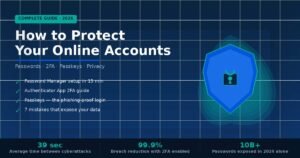
A perfect 20-character random password can still be stolen through phishing — where you type it into a convincing fake login page. Two-factor authentication (2FA) breaks this attack entirely. A stolen password without the second factor is useless. Hardware keys like YubiKey are the most phishing-resistant option. Authenticator apps (Google Authenticator, Authy) are the next best. SMS-based 2FA is better than nothing but is vulnerable to SIM-swapping attacks.
Mistake 6: Using security questions as a fallback
NIST Revision 4 formally advises against knowledge-based authentication questions. “What was the name of your first pet?” is not a secret — it is findable on social media, deducible by people who know you, and guessable from a short list of common pet names. These questions create a secondary attack surface that bypasses the strength of your actual password entirely.
The Myth: Changing Passwords Often Makes You Safer
The old standard was to change passwords every 60 to 90 days. NIST reversed this position officially in 2025, and the reasoning is well-documented: frequent rotation leads users to increment numbers, rotate through predictable variants, or reuse passwords with minor changes. The new guidance is unambiguous — change your password only when there is a specific trigger: a known breach, suspicious activity, or a shared credential that needs to be retired.
Frequently Asked Questions
How long should a strong password be?
NIST’s 2025 update recommends a minimum of 15 characters when a password is your sole authentication factor. For critical accounts — banking, email, and password managers — 20 characters is the more defensible target. Each additional character multiplies brute-force difficulty exponentially, not linearly.
Is a passphrase better than a random password?
Both are strong when properly generated. A password manager’s random output has slightly higher entropy per character. A passphrase trades marginal entropy for memorability. Use random generator output for accounts stored in a password manager; use passphrases for the few accounts you genuinely type by hand.
How do I remember all my strong passwords?
You shouldn’t have to. Password managers exist precisely for this reason. You memorize one strong master passphrase and let the manager handle every other credential. Bitwarden offers a full-featured free tier. 1Password and Dashlane are strong paid options. All three support browser autofill, mobile apps, and secure vault sharing.
Does changing my password regularly make it more secure?
No. NIST no longer recommends routine password changes. The research showed that forced rotation produces predictable, weaker passwords — users increment numbers or make minimal adjustments to satisfy the requirement. Change your password only if there is confirmed evidence of a breach, suspicious account activity, or a credential you shared that needs to be revoked.
What is a breached password, and why does it matter?
A breached password is one that has appeared in a known data leak — exposed when a company’s database was compromised. Attackers maintain databases of billions of these credentials and test them against other services in automated attacks called credential stuffing. Even a long password is a liability if it appeared in a previous breach. Check your email address for free at HaveIBeenPwned.com.
Is two-factor authentication as important as a strong password?
Yes — and for a different class of threat. A strong password stops brute-force and credential-stuffing attacks. Two-factor authentication stops phishing, because a stolen password without the second factor is useless. Use both. Neither alone covers the full threat surface.
Can AI crack my password now?
AI has accelerated dictionary and pattern-based attacks significantly. What hasn’t changed is that a truly random 16+ character password gives AI nothing to exploit — no pattern, no structure, no human predictability. AI-powered cracking is most effective precisely because humans choose non-random passwords. A password generator removes that vulnerability.
Are password managers safe?
Reputable password managers encrypt your vault locally before syncing it to any server. If the company’s servers are breached, attackers receive only encrypted data they cannot read without your master password. The practical risk of not using a password manager — reused and weak passwords across dozens of accounts — is statistically far greater than the theoretical risk of a well-implemented encrypted vault.
Conclusion
The playbook has changed. Making a strong password in 2026 is no longer about hitting a complexity checklist — it’s about three principles: length (15 characters minimum, 20 for critical accounts), uniqueness (every account gets its own credential), and randomness (a generator, not your memory).
NIST’s 2025 revision was explicit: the old complexity requirements made passwords predictably weaker. What genuinely works is length, breach-list screening, and the tools that make secure habits frictionless.
Your action step today: Download Bitwarden (it’s free), generate new passwords for your email, banking, and primary social accounts, and enable two-factor authentication on each. That single session closes the most common attack vectors used against real accounts every day.
Sources: NIST SP 800-63B Revision 4 (finalized July 2025); 2025 Verizon Data Breach Investigations Report; HaveIBeenPwned.com breach database; zxcvbn password strength estimator (open source); MIT password research on crack times; Troy Hunt, independent security researcher.
Make your reading sessions count with our result-producing blog content.