
Online scams cost Americans $12.5 billion in 2023, according to the FBI’s Internet Crime Complaint Center. A significant chunk of that money went to fraudulent websites — pages built to look real enough that people hand over credit card numbers, passwords, or personal data without hesitating.
The frustrating part: modern scam sites are convincing. Many have SSL padlocks, real-looking logos, working contact forms, and customer service “team” photos sourced from stock photo libraries. Spotting them takes more than a gut check.
This guide covers exactly what to look for — URL tricks, design tells, the trust signals scammers imitate, and the quick checks that take under 60 seconds each. By the end, you’ll know how to verify any website before you interact with it.
What Is a Fake Website and Why Do They Exist?
A fake website is a fraudulent page designed to impersonate a legitimate business, government agency, or service. Scammers build them to steal login credentials, financial information, or money directly. They range from rough clones of bank login pages to near-perfect copies of Amazon’s checkout flow.
These sites exist because they produce results. The Anti-Phishing Working Group (APWG) tracked over 1 million unique phishing sites in Q3 2023 alone — a record high at the time. The cost to build one is minimal. The financial damage to someone who isn’t paying attention can run into thousands of dollars.
Types of Fraudulent Sites You’ll Encounter
Not all scam sites work the same way. Knowing the type helps identify the specific red flags to look for.
Phishing pages mimic login screens for banks, email providers, PayPal, or government portals. The goal is capturing your username and password. These are often the most polished — they’re built specifically to be mistaken for the real thing.
Fake online stores list popular products at steep discounts. Some never deliver anything; others send dangerous counterfeit goods. They’re particularly common around major shopping events like Black Friday and holiday sales.
Tech support scam pages display fake virus warnings or Windows alerts and prompt you to call a phone number. The call connects to a scammer who asks for remote access to your device or payment for fake “repairs.”
Clone news and information sites copy the look of real media outlets to spread misinformation, drive ad revenue through clicks, or redirect users to malicious content. These gained significant traction between 2020 and 2023 and continue to circulate on social media.
Why They’re Harder to Spot Than They Used to Be
In 2015, seeing “https://” in the address bar was a reliable safety signal. Scammers changed that. Today, roughly 90% of phishing sites run on HTTPS, according to Google’s Transparency Report. They get free SSL certificates from services like Let’s Encrypt in under ten minutes.
The takeaway matters: HTTPS means encrypted, not safe. Your connection to a fraudulent site is secure — your data just goes directly to whoever built it.
How to Check if a Website Is Safe Before You Click
Before entering any personal information on an unfamiliar site, run through these five checks. Together they take under two minutes and catch the vast majority of fraudulent sites.
Step 1 — Look at the Full URL, Not Just the Brand Name
Type the site name directly into Google rather than clicking links from emails or texts. Once on the page, read the complete URL in the address bar — not just the part you recognize.
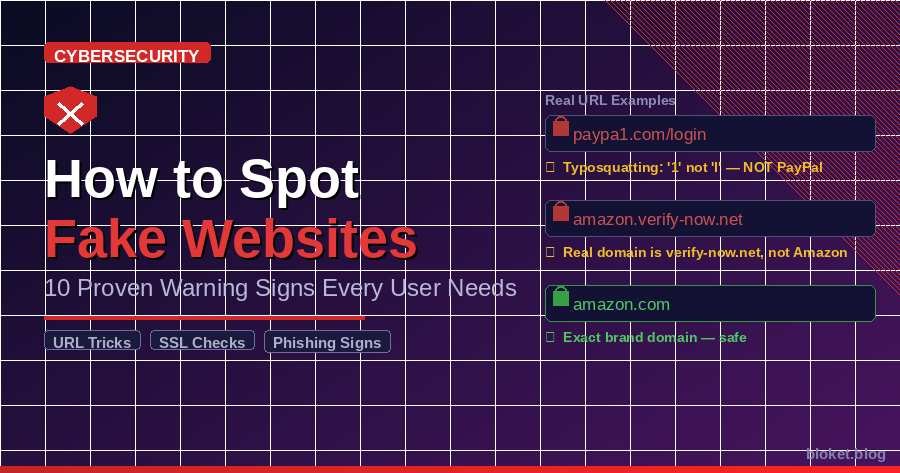
Scammers use these URL tactics most often:
- Typosquatting:
paypa1.com,arnazon.com,gooogle.com - Subdomain tricks:
amazon.account-verify.com— the real domain here isaccount-verify.com, not Amazon - Keyword stuffing the URL:
amazon-customer-support-help-center.com - TLD swaps:
amazon.net,amazon.co,amazon.shop
In my experience reviewing phishing URLs, the subdomain trick causes the most confusion. The brain reads “amazon” and stops — it doesn’t fully process what comes after the dot.
Step 2 — Check the Domain’s Age
A website registered three weeks ago selling name-brand electronics at 70% off is almost certainly a scam. Run a free WHOIS lookup at whois.domaintools.com. Legitimate businesses typically have domains registered for years, often with multi-year renewals already paid. A creation date from last month is a serious warning sign.
Step 3 — Search “[Site Name] + Scam” Before You Buy
Spend 30 seconds searching the site name alongside “scam,” “reviews,” or “legit.” Check Trustpilot, Reddit, and the Better Business Bureau. Legitimate retailers have organic review trails built over years. Scam sites rarely do — or they show clusters of suspiciously similar reviews that all appeared in the same two-week window.
Step 4 — Run It Through Google Safe Browsing
Go to transparencyreport.google.com/safe-browsing/search and paste the URL. Google scans billions of URLs daily and flags known malicious pages. This check takes ten seconds and catches a meaningful portion of confirmed phishing and malware-hosting sites.
Step 5 — Verify the Physical Address
If an online store lists a street address, paste it into Google Maps. Legitimate retailers have real, verifiable locations. Scam storefronts frequently list residential addresses, non-existent street numbers, or the same address as dozens of other fraud operations — which comes up immediately in a Google search of that address.
10 Warning Signs You’re on a Fake Website
Run through this list whenever something feels off. The more boxes a site checks, the higher the risk.
1. The URL looks slightly wrong Even one character difference is significant. Scammers swap lowercase L for capital I (nearly indistinguishable in some fonts), replace “m” with “rn,” or add hyphens in unexpected places. Examine the full URL character by character if anything seems off before doing anything else on the page.
2. The SSL certificate doesn’t match the company Click the padlock icon in your browser and look at the certificate details. A verified company certificate shows the business name. A Let’s Encrypt certificate issued to paypal-secure-login.com is a red flag regardless of the visible padlock. HTTPS confirms encryption, not identity.
3. Prices are absurdly below market rate The FTC receives tens of thousands of complaints every year about non-delivery scams — buyers pay, receive nothing, and have no recourse. If a site lists designer goods, electronics, or software at 60–80% below every legitimate competitor, the product either doesn’t exist or is a dangerous counterfeit.
4. Grammar errors and off-brand writing Professional companies run content through editorial review. Inconsistent capitalization, sentences that read like rough machine translations, or copy that doesn’t match the brand’s usual voice signal the site was cloned quickly or maintained by people working outside the primary language.
5. Stock photos on the “About” or “Team” page A reverse image search on team headshots often reveals those faces on stock photo sites or other scam domains using different company names. I confirmed this personally on a site flagged by a reader — the listed “CEO” photo appeared on four other fraudulent storefronts, each claiming to be a different company.
6. No working contact information Call the phone number listed. Send a test email. Click the live chat button. Legitimate businesses have functional customer service. Fraudulent sites commonly show contact pages with forms that go nowhere, email addresses that bounce, or phone numbers that ring to a disconnected tone.
7. Unusual or limited payment methods Real retailers accept credit cards because credit cards give buyers chargeback rights — and fraud liability falls on the merchant. A site that only accepts wire transfer, cryptocurrency, Zelle, or gift cards is deliberately removing your ability to dispute the charge. That’s not an accident.
8. Policies that don’t add up Read the return policy and terms of service. Scam sites either skip them entirely, paste policies copied from legitimate sites (sometimes with the wrong company name still embedded in the text), or write terms that strip all your consumer rights. Any policy with obvious copy-paste errors or missing contact information is a signal to stop.
9. Aggressive, persistent pop-ups Pop-ups claiming your device is infected, that you’ve won a prize, or that you need to “call Microsoft support immediately” are scams. No legitimate website scans your device or has visibility into your local files. Close the browser tab rather than interacting with anything on the screen.
10. You reached the site through a suspicious email or low-quality ad Context matters as much as the page itself. A site you found through an unsolicited text, an email you didn’t expect, a social media ad with zero engagement, or a sponsored search result impersonating a known brand deserves every check above before you interact with it.
Legitimate Site vs. Suspicious Site: Quick Reference
| Check | Legitimate Website | Suspicious / Fake Website |
|---|---|---|
| URL | Matches brand name exactly | Typos, added words, wrong TLD |
| SSL Certificate | Company-verified | Let’s Encrypt or name mismatch |
| Domain Age | Years old, multi-year renewal | Days or weeks old |
| Prices | At or near market rate | 60–80% below every competitor |
| Contact Info | Working phone, email, address | Non-functional or entirely missing |
| Payment Methods | Credit cards accepted | Wire transfer, gift cards, crypto only |
| Reviews | Verifiable trail on Trustpilot/BBB | None, or a sudden cluster from one week |
| Policies | Clear and company-specific | Missing, vague, or copy-pasted wrong |
Common Mistakes People Make When Checking Websites
Most people skip the checks above because they’ve gotten away with it before. That logic holds until it doesn’t — and the consequences are rarely minor.
Trusting the Padlock as a Safety Guarantee
This is the single most widespread misconception about online security. The padlock confirms your connection is encrypted. It says nothing about whether the website owner plans to steal from you. The FBI explicitly warned consumers in 2023 that HTTPS alone is no longer a reliable safety indicator — yet the misconception persists.
Assuming Google Search Results Are Pre-Vetted
Sponsored search results appear above organic listings and are purchased, not earned through trust. Scammers regularly buy ads impersonating legitimate brands — “Netflix customer support,” “PayPal help line,” “IRS payment portal.” Google removed 5.2 billion ads for policy violations in 2022, many for impersonation. Some still slip through. Looking past the “Sponsored” label is a habit worth building before clicking anything.
Skipping the URL Check on Mobile
On desktop, the full URL is visible in the address bar throughout browsing. On mobile, most browsers display a truncated version — sometimes just the domain name, and even that gets cut short on smaller screens. This is exactly where the subdomain trick works most effectively. Train yourself to tap the address bar and read the entire URL before entering any information on a site you don’t already know.
Treating Visual Design as a Trust Signal
It takes roughly 20 minutes to clone a website’s visual identity — the colors, fonts, layout, and logo positioning. Fraudulent sites often look pixel-for-pixel identical to the real thing. Design quality tells you nothing about legitimacy; it’s the cheapest part of building a convincing fake. Don’t let a polished interface lower your guard.
Thinking the Brand Name in a URL Guarantees Ownership
Netflix owns netflix.com. They do not own netflix-billing-verify.com or netflix.account-update.net. The presence of a brand name anywhere in a URL is not proof that the brand controls the domain. Check who actually owns a domain with a WHOIS lookup if you’re unsure — it takes less than a minute and removes any ambiguity.
Reusing the Same Password Across Sites
This isn’t a website-checking mistake, but it’s directly relevant. When a phishing site captures your login credentials, attackers immediately try those same credentials on banking sites, email providers, and major retailers. A password manager that generates unique passwords for every account turns a credential theft event into a single-account problem instead of a cascade.
Frequently Asked Questions
How can I tell if a website is real or fraudulent? Start with the URL — look for typos, extra words, or wrong domain extensions. Then check domain age with a WHOIS lookup, search the site name alongside “scam” on Google, and verify that contact information actually works. No single check is foolproof, but running three or four together catches the majority of malicious sites.
Is it safe to visit a suspicious site without clicking anything? Simply loading a page carries low risk on a modern, updated browser. The real danger begins when you click links, download files, enter personal information, or allow pop-ups to run. If you suspect a page is fraudulent, close the tab immediately and clear your browser cache as a basic precaution.
Can fraudulent websites steal your information without you entering anything? It’s uncommon but possible through drive-by downloads — malicious scripts that execute when a page loads. This primarily affects outdated browsers or devices without current security patches. Keeping your browser and operating system updated eliminates the large majority of this risk.
What should I do if I already entered information on a fake website? Act immediately. Change passwords on the affected account and anywhere you reuse that same password. If you entered payment information, call your bank or card issuer to dispute charges and consider freezing the account. File a complaint at reportfraud.ftc.gov. Speed matters significantly in limiting the damage.
How do scammers make fraudulent sites look legitimate? They copy visual designs directly from real sites, register similar domain names, obtain free SSL certificates, and sometimes scrape real product listings or news content to populate pages. Some invest in fake review systems running for months before targeting a large audience. Quick phishing pages look rough; long-running fraud storefronts can be nearly impossible to distinguish visually from the real thing.
Do fake websites appear in Google search results? Yes — both in organic results (particularly for newly registered domains targeting trending topics or branded search terms) and in sponsored results where scammers buy ads impersonating real companies. Google removes billions of violating ads annually, but some get through every filtering layer. This is why reading the full URL matters even after clicking a Google result.
Is a website with a padlock always safe to use? No. The padlock (HTTPS) only confirms that the connection between your browser and the web server is encrypted. It does not verify that the site owner is legitimate or that your information won’t be misused. The FBI explicitly warns against treating HTTPS as a standalone safety guarantee.
What makes someone more likely to fall for a fraudulent site? Time pressure is the largest factor. Sites that manufacture urgency — “This offer expires in 8 minutes” or “Your account has been suspended — verify immediately” — short-circuit careful thinking. The urgency is almost always manufactured. Slowing down whenever a site tries to rush you is one of the most effective protective behaviors you can build.
Conclusion
Fraudulent websites are built to catch you in the moment when you’re moving fast and not fully paying attention. The people who build them are counting on exactly that gap.
The checks in this guide — URL inspection, domain age lookup, Google Safe Browsing, contact verification — take under two minutes combined. That’s a small investment compared to dealing with unauthorized charges, identity theft cleanup, or months of compromised accounts and damaged credit.
Build the habit of running at least three checks on any unfamiliar site before entering personal information. Share these warning signs with family members who are less familiar with online fraud tactics — particularly older relatives who are disproportionately targeted by phishing operations.
If you’ve already encountered a fraudulent site, report it at reportfraud.ftc.gov (FTC) or ic3.gov (FBI). Both agencies track these operations and use reports to pursue takedowns and prosecution
Explore topics you love with our passion-driven curated article picks.