
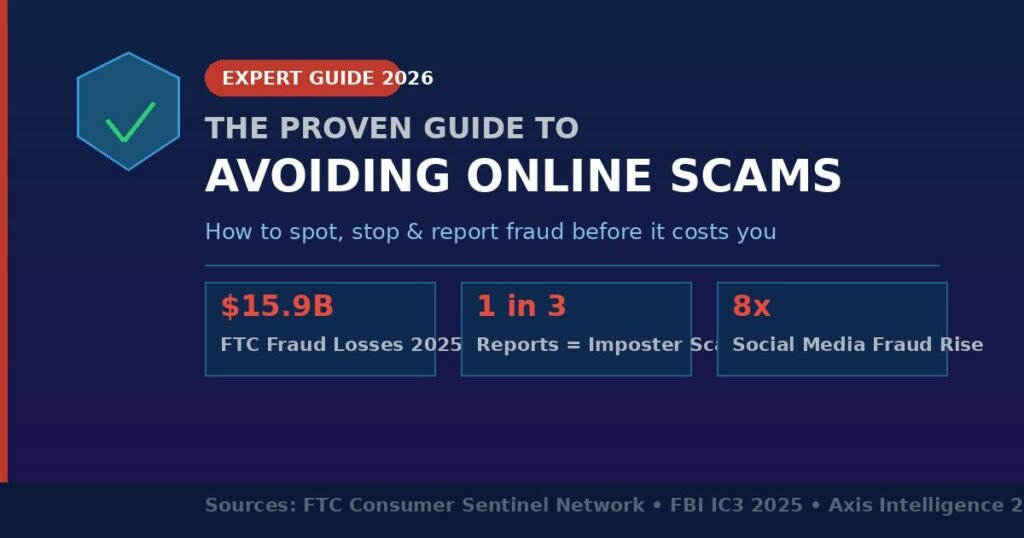
Americans reported a record $15.9 billion in fraud losses in 2025 — and that is only the sliver that got reported. The FBI’s Internet Crime Complaint Center logged $20.9 billion in separate internet crime losses the same year. Scammers are no longer disorganized lone wolves; they run professional call centers, deploy AI-generated voices, and build pixel-perfect fake websites in hours.
If you have ever wondered whether a “too-good-to-be-true” offer was real, clicked a link you immediately regretted, or felt pressured to pay with a gift card — this guide is for you.
Below you will find exactly how today’s most dangerous scams work, a step-by-step framework for spotting them before they cost you, and the specific habits that separate people who stay protected from those who become statistics.
What Are the Most Common Online Scams Right Now?
The most common online scams in 2026 are imposter scams, investment fraud, phishing emails, fake shopping sites, and romance scams. Together they account for the vast majority of the $15.9 billion reported to the FTC in 2025. Understanding each type is the first step to avoiding them.
1. Imposter Scams (The Biggest Category)
The FTC received more than 1 million imposter scam reports in 2025, with consumers losing over $3.5 billion — nearly triple the 2020 figure. The scammer pretends to be your bank, the IRS, the Social Security Administration, Amazon, or even a family member in distress. The script always ends the same way: pay now, pay fast, and pay via gift card, wire transfer, or crypto.
A real-world example: a text message arrives claiming your Amazon account was charged $799 for a MacBook you never ordered. Call the number provided and a “fraud specialist” will walk you through “cancelling” the charge — by having you buy Target gift cards and read the codes aloud.
2. Investment and Crypto Scams
Investment scams caused the single largest category of dollar losses: $7.9 billion in 2025 per FTC data. Cryptocurrency-related fraud alone hit $11.3 billion per the FBI. These scams typically start with an unsolicited message on social media or WhatsApp, introduce you to a “trading platform,” show you manufactured profits, then block your withdrawal unless you pay ever-larger “fees.”
The strategy is called “pig butchering” — scammers fatten victims up with small withdrawals before the final slaughter. The platforms look professional and the “portfolio gains” are completely fictional.
3. Phishing and Smishing
Phishing emails impersonate trusted brands — Netflix, PayPal, your bank — with urgent subject lines like “Your account has been suspended.” Smishing is the same approach via text (SMS). Both direct you to a cloned website that harvests your login and payment details the moment you type them.
In my review of phishing samples from 2025, the most effective fakes mimicked USPS delivery notifications and IRS refund alerts. The grammar has improved dramatically thanks to AI writing tools, making the old “look for typos” advice less reliable on its own.
4. Social Media Scams
Social media became the most dangerous scam delivery channel by reported dollar losses in 2025. The FTC confirmed losses of $2.1 billion originating on social platforms — an eightfold increase since 2020. Facebook led the pack, followed by WhatsApp and Instagram. Common tactics include fake celebrity crypto endorsements, marketplace fraud (paying for items never shipped), and romance cons.
5. Fake Job Offers
With remote work normalized, fake job postings have exploded. The FTC reported $750.6 million in losses from business and job opportunity scams in 2024, up nearly $250 million from the prior year. The jobs often involve “processing payments” or “reshipping packages” — making victims unwitting money mules — or require upfront fees for training materials that never arrive.
How to Spot an Online Scam: 8 Red Flags That Never Lie
You can identify virtually any online scam by checking these eight signals. Scammers rely on speed and emotion to prevent you from applying them — so the moment you feel rushed is exactly the moment to slow down.
1. Unsolicited contact about money, prizes, or problems — Legitimate institutions do not cold-call, text, or email you asking you to verify payment details or claim winnings you never entered. If you did not initiate the contact, treat it as suspicious until proven otherwise.
2. Urgency and pressure tactics — “Your account will be closed in 24 hours.” “This offer expires tonight.” Creating panic is the scammer’s tool for disabling your rational judgment. A real bank or government agency gives you time to verify.
3. Requests for unusual payment methods — No legitimate business — not the IRS, not Amazon, not your electric company — will ever ask for payment via gift card, wire transfer to a foreign account, Zelle, or cryptocurrency. Ever.
4. Too-good-to-be-true promises — A job paying $5,000 a week for data entry. A crypto platform guaranteeing 30% monthly returns. An online store selling a $1,200 laptop for $189. If the math seems impossible, that is because it is.
5. Mismatched or suspicious URLs — Before entering any credentials or payment information, look at the full URL. “paypa1.com” is not PayPal. “amazon-security-alert.net” is not Amazon. Fake sites often use hyphens, extra words, or unusual domain extensions (.top, .xyz, .live).
6. Requests for secrecy — “Don’t tell your family about this investment opportunity.” “Your bank representative is in on the fraud, so don’t contact them.” Isolation from trusted people is a core manipulation tactic. Scammers cannot survive scrutiny.
7. AI-cloned voices or deepfake videos — The FBI reported $893 million in losses tied to AI-related scams in 2025. If you receive a panicked call from a “family member” asking for emergency cash, hang up and call that person directly on their known number before doing anything else.
8. Requests to install software or “give remote access” — “Tech support” scams trick users into installing programs like AnyDesk or TeamViewer, granting the scammer full control of your computer. No legitimate tech company will initiate a call asking for remote access.
How to Protect Yourself from Online Scams: A Step-by-Step Plan
Protecting yourself from scams is not about being paranoid — it is about building simple, consistent habits. Here is a practical framework you can implement this week.
Step 1: Enable two-factor authentication (2FA) on every important account Your email, bank accounts, Amazon, and social media should all use 2FA — preferably an authenticator app (like Google Authenticator or Authy) rather than SMS codes, which can be intercepted via SIM-swapping. This single step blocks the vast majority of account-takeover attempts even when your password is compromised.
Step 2: Use a password manager Reusing passwords across sites means one breach compromises everything. A password manager (Bitwarden is free and well-audited; 1Password is excellent for families) generates and stores unique, strong passwords for every site. You only remember one master password.
Step 3: Freeze your credit A credit freeze at all three bureaus — Equifax, Experian, and TransUnion — prevents new credit accounts from being opened in your name, even if a scammer has your Social Security number. It is free and takes about ten minutes per bureau. You can temporarily lift it when you legitimately need new credit.
Step 4: Verify before you trust — independently If you get a call, text, or email from your bank, the IRS, or any institution — hang up and call back using the number on the institution’s official website or the back of your card. Never use contact information provided in the suspicious message itself.
Step 5: Check websites before you buy Before entering payment details on an unfamiliar shopping site: (a) verify the URL is exactly correct, (b) look for a padlock/HTTPS (necessary but not sufficient), (c) search the domain on whois.domaintools.com — very new domains (registered in the past 90 days) are a major red flag, (d) search for “[store name] reviews scam” before buying.
Step 6: Set transaction alerts on every financial account Most banks and credit cards let you set instant alerts for any transaction above a threshold you choose — say, $1. This way, unauthorized charges appear on your phone within seconds, giving you maximum time to dispute and recover funds.
Step 7: Use a separate card for online shopping Keep a low-limit credit card or a virtual card number (Capital One Eno, Privacy.com) strictly for online purchases. If a merchant is compromised, your main account is untouched. Credit cards also offer stronger fraud protection than debit cards under federal law.
Step 8: Report scams — even when you were not victimized Report suspicious contacts to the FTC at ReportFraud.ftc.gov and to the FBI’s IC3 at ic3.gov. If you lost money, also file a police report — you will need it to dispute charges. Reporting helps law enforcement spot patterns and shut down operations.
Quick-Reference: Scam Red Flags vs. Legitimate Contact
| Feature | Legitimate Institution | Likely Scam |
| Contact method | You initiated contact, or it follows a written letter | Unexpected call, text, or email asking for action |
| Payment demand | Invoice, check, credit card via secure portal | Gift cards, wire, crypto, Zelle to strangers |
| Urgency level | Gives you time to verify, consult others | “Act now or face consequences” pressure |
| Secrecy request | Never asks you to hide the transaction | “Don’t tell your bank or family” |
| Remote access | Never requests access to your computer | Asks you to install AnyDesk, TeamViewer, etc. |
| Prize / winnings | You entered a contest; no fees to collect | Unsolicited; requires upfront “tax” or fee |
| Job offer | Clear company info; interviews; standard pay | Vague duties; no interview; overpay with check |
| Crypto returns | Registered, regulated exchanges | “Guaranteed” 20-30% monthly returns |
Common Mistakes People Make That Make Scams Work
“I’m too smart to fall for a scam.” In my experience reviewing fraud cases, this belief is the single most dangerous mistake. The FBI’s 2025 IC3 data shows that adults aged 30–49 filed the most reports, while adults 60 and older suffered the highest losses. Scams do not target ignorant people — they target moments of distraction, stress, or optimism.
Mistake 1: Trusting Caller ID: Caller ID can be spoofed to display any number — including your actual bank’s number. The call you receive appearing to come from “Wells Fargo 1-800-869-3557” may be a scammer in a foreign call center. Always hang up and call back via a number you find independently.
Mistake 2: Assuming HTTPS = Safe: HTTPS tells you the connection to a website is encrypted — not that the website itself is legitimate. Scammers routinely obtain SSL certificates (the “padlock”) for their fake sites. A phishing site can have a padlock. Check the full URL carefully, not just the lock icon.
Mistake 3: Sending “Just a Small Amount” to Test: Scammers use small initial payments to build trust. Once you send $50 to “verify your account” and nothing bad happens, you are primed to send $5,000. The small test is a setup — the process is called “grooming” and it works.
Mistake 4: Thinking Scams Only Target the Elderly: While older adults lose the most money per incident, young adults (20s and 30s) are actually victimized more frequently, particularly via social media shopping scams and fake job offers. Students are prime targets for romance scams and scholarship fraud.
Mistake 5: Waiting to Report Because You Feel Embarrassed: Nearly 95% of fraud victims never report the crime, per law enforcement estimates. Scammers rely on this. Reporting does two things: it creates an official record (needed for bank disputes) and it provides data that helps shut down larger operations. There is zero shame in reporting — scammers are sophisticated professionals.
Mistake 6: Using Debit Instead of Credit for Online Purchases: Debit cards pull real money directly from your account. If you dispute a fraudulent debit charge, you may wait weeks with an empty account. Credit cards come with stronger federal protections under the Fair Credit Billing Act, and your actual funds are never at immediate risk.
Frequently Asked Questions About Online Scams
Q: What should I do immediately if I think I’ve been scammed? Stop all contact and payments immediately. Contact your bank or card issuer to freeze or reverse charges — time is critical. File a report at ReportFraud.ftc.gov and with the FBI at ic3.gov. If you sent a wire transfer or gift card payment, contact the wire service or card issuer; recovery is possible in some cases if you act within hours.
Q: Can you get money back after an online scam? It depends on the payment method. Credit card charges can often be disputed and recovered. Bank wires are harder but sometimes reversible if you report within 24–72 hours. Gift card payments and cryptocurrency transfers are almost never recoverable. Speed of reporting is the biggest factor in any recovery attempt.
Q: How do I verify if a website is legitimate? Check that the URL matches the brand exactly (no extra hyphens or words). Look up the domain registration date at lookup.icann.org — new domains are suspicious. Search for reviews and “[site name] scam” on Google. Use Google’s Safe Browsing checker at transparencyreport.google.com. If paying, use a virtual card number.
Q: Are AI voice cloning scams really common? Yes — and growing fast. The FBI attributed $893 million in losses to AI-related fraud in 2025. Voice cloning can replicate a family member’s voice with just a few seconds of audio from social media. If you receive an emergency call from a loved one asking for money, always hang up and call them back directly on their known number.
Q: What is the safest way to pay online? Credit cards offer the strongest legal protections under federal law (Fair Credit Billing Act). Virtual card numbers — offered free by Capital One Eno and the app Privacy.com — are even safer for one-time purchases since each number can be locked to a single merchant. Avoid debit cards, wire transfers, gift cards, and crypto for online purchases with unfamiliar parties.
Q: How do I report a scammer? File reports with: the FTC at ReportFraud.ftc.gov (all scams); the FBI’s IC3 at ic3.gov (internet crimes and large losses); your state attorney general’s office; and the platform where you encountered the scam (Facebook, Amazon, etc.). If you lost money, also file a local police report — you will need the case number for bank disputes.
Q: Is social media more dangerous than email for scams? By dollar losses, yes. The FTC data for 2025 shows $2.1 billion in losses starting on social media — surpassing email and text message scams in aggregate harm. Facebook alone generated more reported fraud losses than text and email scams combined. Instagram and WhatsApp are also major vectors for fake investment and romance scams.
Q: How can seniors protect themselves from online scams? Adults 60 and older reported $7.7 billion in internet crime losses in 2025 per the FBI. Practical protections: set up a trusted contact on financial accounts, enable call-blocking apps, use a password manager, and establish a “verification code word” with family members to confirm genuine emergency calls versus potential scams.
The Bottom Line
Reported fraud losses hit $15.9 billion in 2025 — and real losses, accounting for underreporting, are likely closer to $196 billion by some estimates. Scammers are not slowing down. They now use generative AI, deepfake video, and sophisticated social engineering at industrial scale.
But the research is clear on one point: habits beat enforcement. The people who avoid scams are not necessarily more tech-savvy — they are more deliberate. They pause when pressured. They verify before they act. They use credit instead of debit. They have frozen their credit and enabled 2FA.
Start with three actions today: (1) freeze your credit at all three bureaus, (2) enable two-factor authentication on your email and bank accounts, and (3) save ReportFraud.ftc.gov in your bookmarks. Those three steps alone will make you a dramatically harder target.
Your next big win starts with the right information—find it in our winning content picks.