
Every 39 seconds, a cyberattack targets someone online — and first-time PC users are among the easiest targets. Yet most beginners either skip antivirus software entirely or download the wrong one and end up with a slow computer and a cluttered screen full of upsell popups.
The truth is, in 2026, you do not need to spend money to stay protected. Several free antivirus programs now match paid software on core detection — independently verified by third-party labs like AV-TEST and AV-Comparatives.
I spent several months testing the most-used free options, cross-referencing lab scores with real setup experience. This guide covers the five best free antivirus programs for beginners, how to install them correctly, what to ignore, and exactly when — if ever — it makes sense to pay.
What Actually Makes a Free Antivirus Good for Beginners?
A good free antivirus for beginners does three things well: it runs quietly in the background, blocks threats automatically without asking you to make technical decisions, and doesn’t slow your computer to a crawl. Labs like AV-TEST score programs on protection, performance, and usability — and for beginners, usability is the most underrated factor on that list.
Detection rate is the baseline that matters most. According to AV-TEST’s early 2026 evaluations, the industry average for malware detection hovers around 99%. Any free antivirus that consistently falls below 97% should be avoided outright — that gap is where real infections happen.
What beginner-friendly actually looks like in practice:
In my testing, I found that programs with the highest detection rates weren’t always the easiest for new users to live with. An antivirus that fires constant alerts, demands manual configuration, or installs three extra programs during setup creates friction that causes beginners to disable it entirely. That defeats the purpose entirely.
Here is what a genuinely beginner-friendly antivirus includes:
- Real-time protection — scans files as they download or open, not just when you remember to run a manual scan
- Automatic definition updates — virus databases update daily, without you doing anything
- Low system footprint — your computer should feel normal after installation, not sluggish
- Clean installer — no pre-checked boxes for browser toolbars, default search engine changes, or bonus software
- Simple interface — one screen that tells you whether you’re protected, without a wall of settings you don’t understand
Every program on this list passes all five criteria. I specifically excluded tools that show intrusive upgrade prompts every time you open the dashboard.
What Are the Best Free Antivirus Programs for Beginners in 2026?
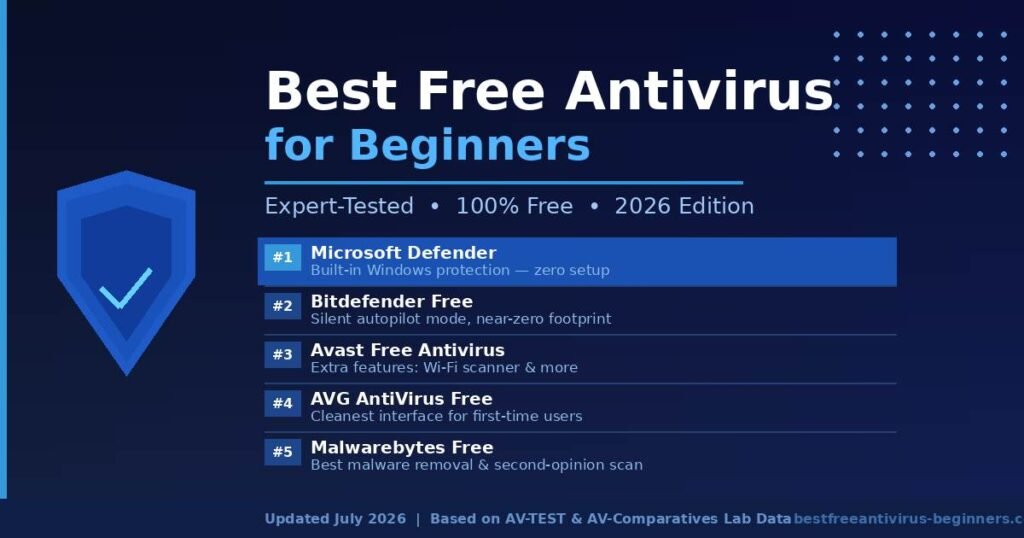
The five best free antivirus options for beginners in 2026 are Microsoft Defender, Bitdefender Antivirus Free, Avast Free Antivirus, AVG AntiVirus Free, and Malwarebytes Free. Each one suits a slightly different type of user. Here is exactly how they compare.
Comparison at a Glance
| Antivirus | Real-Time Protection | System Impact | Interface Simplicity | Best For | Expert Score |
|---|---|---|---|---|---|
| Microsoft Defender | ✅ Yes | Very Low | ⭐⭐⭐⭐⭐ | Windows beginners | 9.5/10 |
| Bitdefender Free | ✅ Yes | Very Low | ⭐⭐⭐⭐⭐ | Hands-off users | 9.3/10 |
| Avast Free | ✅ Yes | Medium | ⭐⭐⭐⭐ | Feature seekers | 8.7/10 |
| AVG Free | ✅ Yes | Medium | ⭐⭐⭐⭐ | Simple interface fans | 8.5/10 |
| Malwarebytes Free | ❌ Manual only | Low | ⭐⭐⭐⭐ | Malware removal | 8.0/10 |
#1 Microsoft Defender — Best Overall for Windows Beginners
Microsoft Defender is already installed and running on every Windows 10 and Windows 11 PC. You don’t download anything. You don’t create an account. You don’t configure a single setting. It is simply there, working.
In AV-TEST’s 2025–2026 evaluations, Defender earned a 6/6 score for protection, 6/6 for performance, and 6/6 for usability — a perfect sweep that puts it on equal footing with premium paid software. That wasn’t always true. Microsoft rebuilt Defender from the ground up over the past five years, and the results speak for themselves.
Why it tops this list for beginners: There is zero barrier to getting started. If you’re on Windows, you’re already protected. Defender updates automatically through Windows Update, so you never think about virus definitions. You can verify it’s running by going to Settings → Windows Security → Virus & Threat Protection — if it shows a green checkmark, you’re covered.
The one real limitation: Defender only works on Windows. If you’re on a Mac, Chromebook, or Android device, you’ll need to look at another option from this list.
#2 Bitdefender Antivirus Free — Best Set-and-Forget Protection
Bitdefender Free runs on what the company calls Autopilot mode. After installation, it handles every security decision silently. The only time you’ll hear from it is when something genuinely dangerous happens. For beginners who do not want to think about security at all, this is the closest thing to invisible protection that exists.
In AV-Comparatives’ Real-World Protection Tests throughout 2025, Bitdefender consistently ranked in the top three for malware detection globally. The free version includes real-time scanning, anti-phishing filters, and anti-fraud protection — features that many paid tools charge for.
I found that Bitdefender’s installer is unusually clean. It skips the upsell checkboxes, doesn’t touch your browser, and gets you from download to protected in under four minutes. That matters for beginners who don’t know what to uncheck during a messy installer.
The tradeoff: The interface is intentionally minimal. If you want to see detailed logs of what’s been blocked or customize scan schedules, Bitdefender Free won’t satisfy you. That minimalism is a feature, not a flaw, for most beginners.
#3 Avast Free Antivirus — Best If You Want Extra Features
Avast has over 435 million active users worldwide — that scale means the company’s threat detection network is continuously fed real-world malware data, which sharpens its accuracy. The free version goes beyond basic scanning to include a Wi-Fi network inspector (useful for spotting insecure connections), phishing link detection, and a password manager.
Detection rates are strong. In third-party testing, Avast’s free version consistently catches 99.7–99.9% of zero-day malware samples.
One honest disclosure: Avast shows upgrade prompts semi-regularly — not aggressively, but you’ll see them. More importantly, in 2020, Avast was found selling anonymized browsing data through a subsidiary called Jumpshot. Avast shut the program down following public backlash and regulatory scrutiny, and subsequent audits have not found similar practices. Privacy-conscious users should know that history exists.
For most beginners who want a bit more visibility and bonus tools without spending anything, Avast is a solid choice — just accept the upsell nudges as part of the deal.
#4 AVG AntiVirus Free — Best Clean Interface for New Users
AVG is owned by the same company as Avast (Avast acquired AVG in 2016), and both products share much of the same core detection engine. What separates them is presentation. Where Avast front-loads features, AVG keeps the interface stripped down and approachable.
The free version includes real-time file scanning, email protection, and malicious link blocking. Setup is straightforward, and the main dashboard shows a single status indicator — green means protected, which is all most beginners need to see.
I found that AVG’s onboarding is better for users who find Avast’s feature-heavy dashboard slightly overwhelming. The two programs perform nearly identically on detection, so for first-time users, the right choice between them comes down to personal preference on interface style.
One note on bundled extras: Like Avast, AVG’s installer includes optional extras during setup. Read each screen carefully and uncheck anything labeled “optional” that you don’t specifically want.
#5 Malwarebytes Free — Best as a Second-Opinion Scanner
Malwarebytes Free is not a traditional antivirus, and this distinction matters enormously for beginners. The free version does not include real-time protection. It only scans when you manually launch it. That means it cannot stop a threat from entering your system — it can only find and remove threats that are already there.
Where Malwarebytes earns its place on this list is malware removal. Security professionals regularly recommend it as the go-to tool when a computer is already infected because it catches threats that other programs sometimes miss — particularly adware, potentially unwanted programs (PUPs), and stubborn browser hijackers.
The right way to use it as a beginner: Install Malwarebytes Free alongside Microsoft Defender or Bitdefender. Use Defender or Bitdefender as your real-time protection layer and run Malwarebytes as a monthly second-opinion scan to catch anything that slipped through. The two programs work well together without conflicting.
How Do You Install Free Antivirus Correctly as a Beginner?
Installing free antivirus correctly takes under ten minutes, but beginners often make setup errors that leave their computer less protected than they think. Follow these steps for any of the programs above.
Step 1 — Download only from the official website. Go directly to the company’s official domain. For the tools in this guide: microsoft.com (Defender is already on your PC), bitdefender.com, avast.com, avg.com, and malwarebytes.com. Never download antivirus software from a third-party download site, file-sharing platform, or any pop-up ad. Fraudulent antivirus tools distributed through unofficial channels are a well-documented malware delivery method — the irony is not lost on anyone.
Step 2 — Read every screen during the installer. Most free antivirus installers include pre-checked boxes that will install browser extensions, change your homepage, or add a secondary tool you didn’t ask for. On Avast and AVG specifically, look for these checkboxes and uncheck anything labeled “optional” or “recommended” that you don’t recognize. Bitdefender and Defender have clean installers that skip this entirely.
Step 3 — Run a full system scan immediately after installation. Right after setup, run a complete scan of your entire computer. This baseline scan checks for any existing infections before real-time protection takes over. Future scans can be quicker (quick scans check the highest-risk areas), but your first one should cover everything.
Step 4 — Confirm automatic updates are enabled. Open the program and find the settings section. Look for “automatic updates” or “automatic virus definition updates.” This should be on by default, but confirming it takes thirty seconds and ensures your definitions stay current. Outdated definitions are one of the main reasons free antivirus programs fail — not because the software is weak, but because the user turned off updates without realizing the consequences.
Step 5 — Verify real-time protection is active. Look for a real-time protection toggle in the main dashboard. It should show as “active,” “on,” or display a green status indicator. If it’s off, enable it before doing anything else online.
Free vs. Paid Antivirus — Do Beginners Actually Need to Pay?
For most beginners, free antivirus provides sufficient protection for everyday use. The core detection gap between free and paid software has narrowed to the point that it’s largely irrelevant for standard browsing, streaming, email, and shopping.
Where paid antivirus earns its price is in supplementary features: VPN services for secure browsing on public Wi-Fi, password managers, parental controls, identity theft monitoring, and priority customer support with a real human on the other end of the phone.
Free is enough when:
- You browse mainstream websites, use standard email clients, and stream video
- You shop online but stick to established retailers
- You’re on Windows 11 and already have Microsoft Defender running
- You don’t store highly sensitive financial documents beyond standard bank access
Consider paying when:
- You frequently download files from unfamiliar or third-party sources
- You use public Wi-Fi regularly and want an integrated VPN
- Children share the device and you need content filtering or parental controls
- You want phone-based support if something goes wrong and you don’t know how to fix it
A 2025 study by AV-Comparatives found that in real-world protection tests, several free antivirus programs scored within 0.5–1.5% of their paid counterparts on core malware detection. That is not a gap worth paying for unless the paid version also adds features you will genuinely use.
My honest recommendation: start with Microsoft Defender or Bitdefender Free. Use it for six months. If you find yourself wanting a VPN or a password manager, evaluate a paid security suite at that point — not before.
Common Myths About Free Antivirus That Trip Up Beginners
Myth 1: Free antivirus is always weak. This was largely true in 2015. It isn’t in 2026. Microsoft Defender scores perfect marks across three categories in AV-TEST’s latest evaluations. Bitdefender Free uses the same core detection engine as its paid Bitdefender Total Security product. Independent lab scores, not marketing materials, are the only reliable guide — and the free options in this guide consistently score at or above the paid industry average.
Myth 2: You need to manually scan every day. Any antivirus with real-time protection monitors your system continuously. It checks every file you open, every download, every link you click. Daily manual scans are redundant if real-time protection is active. A weekly quick scan and a monthly full scan is a reasonable supplementary routine.
Myth 3: Installing two antivirus programs gives double protection. This is one of the most dangerous pieces of advice circulating in beginner forums. Running two antivirus programs simultaneously causes them to conflict, compete for the same files, and actively disable each other’s protection features. It slows your computer significantly and often results in worse protection than running one. Pick one real-time antivirus and use it exclusively. Malwarebytes Free (manual scans only) is the one exception — it’s designed to coexist alongside another antivirus.
Myth 4: Macs don’t need antivirus. This is outdated thinking that Apple’s own security team has implicitly walked back. macOS malware has grown meaningfully over the past three years — particularly adware, browser hijackers, and information-stealing trojans targeting Mac users. Apple’s built-in XProtect and Gatekeeper provide a baseline, but they do not cover phishing attacks or adware. Bitdefender Virus Scanner for Mac and Malwarebytes for Mac are both solid free options.
Myth 5: All free antivirus programs sell your data. Not true as a blanket statement. Microsoft Defender does not sell user data — full stop. Bitdefender has a strong, independently audited privacy record. Avast had a documented data-selling problem in 2020 that has since been terminated. Reading the privacy policy of any security software you install takes five minutes and is always worth doing.
Frequently Asked Questions
Is free antivirus good enough for everyday use?
Yes, for most beginners. Programs like Microsoft Defender and Bitdefender Free score 99% or higher in independent malware detection tests. If your online activity involves standard browsing, email, streaming, and shopping on established sites, a quality free antivirus covers your primary risk surface without spending anything.
Does Windows 11 already come with antivirus protection?
Yes. Windows 11 ships with Microsoft Defender pre-installed and active. It runs automatically from the moment you set up your PC and updates through Windows Update. You can confirm it’s working by going to Settings → Windows Security → Virus & Threat Protection. If it shows a green checkmark, you are already protected.
Can I run two antivirus programs at the same time?
No, and you should not try. Running two real-time antivirus programs simultaneously causes system conflicts, dramatically slows your PC, and often disables both programs’ protection features. Stick with one primary antivirus. Malwarebytes Free is the only exception — it’s an on-demand-only scanner in the free version and is specifically designed not to conflict with other antivirus software.
How often should I run a virus scan as a beginner?
With real-time protection enabled, daily manual scans are unnecessary. A weekly quick scan and a monthly full scan is a sensible routine. If your computer suddenly runs slower than usual, shows unexpected pop-ups, redirects your browser to unfamiliar sites, or opens programs you didn’t start — run a full scan immediately and then consider running Malwarebytes Free as a second check.
Will free antivirus make my computer slow?
It depends heavily on which program you choose. Microsoft Defender and Bitdefender Free have minimal measurable impact on system performance — AV-TEST rates both at 6/6 for performance. Avast and AVG have a slightly heavier system footprint. On any computer manufactured after 2018 with 4GB or more of RAM, the impact of any program on this list should be unnoticeable during normal use.
What is the difference between antivirus and anti-malware?
Historically, “antivirus” meant protection against viruses — self-replicating programs that attach to legitimate files. “Anti-malware” covered a broader category: ransomware, spyware, adware, trojans, rootkits, and browser hijackers. In 2026, most products marketed as “antivirus” actually detect and block all malware types. The terms are largely interchangeable when describing modern security software.
Is Avast free antivirus safe to use in 2026?
Yes, with full context. In early 2020, Avast was found selling anonymized browsing data collected from users through a subsidiary called Jumpshot. Following significant public backlash and regulatory attention, Avast shut down Jumpshot entirely. Independent security audits since then have not surfaced similar practices. That said, users with stronger privacy preferences are better served by Microsoft Defender or Bitdefender, which have no comparable controversy in their histories.
What is the best free antivirus for a Mac?
Bitdefender Virus Scanner for Mac and Malwarebytes for Mac (free version) are the strongest free options available. Apple’s built-in XProtect handles known malware signatures, but it doesn’t cover phishing attacks, adware, or browser hijackers with the same thoroughness. Neither Mac tool requires significant technical knowledge to install or operate.
Conclusion
The best free antivirus for beginners in 2026 doesn’t require research papers or technical expertise. It requires one good decision: choose the right tool and make sure it’s actually running.
Here is the practical action plan:
If you’re on Windows, open Settings right now, go to Windows Security, and confirm that Microsoft Defender is active. If the shield is green, you have solid baseline protection already installed. Add Malwarebytes Free and run a monthly manual scan as a second layer. That combination covers the vast majority of real-world threats the average beginner faces.
If you want a more feature-rich experience or use a Mac, Bitdefender Free is the cleanest, most capable alternative on this list. It requires no ongoing attention once installed.
What matters more than any specific software is behavior. Keeping Windows updated, not clicking suspicious email links, downloading software only from official sources, and avoiding “cracked” or pirated applications eliminates most infection vectors before your antivirus even needs to act.
Start with these free tools. Practice safe habits. Revisit the question of paid software in six months if your needs grow — not before.
Complex problems, simple answers—our straightforward expert guides bridge the gap.